
![Apprise-API (stack)]() Apprise-API (stack)
Apprise-API (stack)
Apprise API was designed to easily fit into existing (and new) eco-systems that are looking for a simple notification solution.70+ services
Source: https://github.com/caronc/apprise-api
Source details
Configuration
TypeComposelinuxlscr.io/linuxserver/apprise-api/config : $DATA_LOCATION/$SERVICE/configunless-stoppedStandalone Install
Select an install method, to see config/commands for deploying Apprise-API (stack)
Install on Portainer
Import all app templates into your Portainer instance, for easy 1-click deploys
- Ensure both Docker and Portainer are installed, and up-to-date
- Log into your Portainer web UI
- Under Settings → App Templates, paste the below URL
- Head to Home → App Templates, and the list of apps will show up
- Select Apprise-API (stack), fill in any config options, and hit Deploy
Template Import URL
https://raw.githubusercontent.com/Lissy93/portainer-templates/main/templates.json
Show Me

Original stackfile
The compose file this template deploys, straight from its repo:
#& type: 3
#& title: Apprise API
#& description: Send notifications to more then 70+ services.
#& note: Website: <a href='https://github.com/caronc/apprise-api' target='_blank' rel='noopener'>Github.com</a>
#& categories: SelfHosted
#& platform: linux
#& logo: https://warehouse-camo.ingress.cmh1.psfhosted.org/a22d9206f80dfbb10748b6764fee932ff0ae1a8f/687474703a2f2f7265706f2e6e75787265662e636f6d2f7075622f696d672f6c6f676f2d617070726973652e706e67

#% SERVICE: Name of the service (No spaces or points) [apprise-api]
#% DATA_LOCATION: Data location (Example: /apps/service) [/portainer/Files/AppData/Config/apprise]
#% URL: Service URL (Example: service.com)
#% NETWORK: Your Traefik network (Example: proxy) [proxy]

# Work with Portainer
services:
  apprise-api:
    image: lscr.io/linuxserver/apprise-api
    container_name: $SERVICE
    volumes:
      - $DATA_LOCATION/$SERVICE/config:/config
    healthcheck:
      test: ["CMD", "bash", "-c", "exec 5<>/dev/tcp/127.0.0.1/8036 && echo -e 'GET /healthz HTTP/1.1\n\n' >&5 && cat <&5 | head -n 1 | grep 200"]
      interval: 1m
      timeout: 30s
      retries: 3
    restart: unless-stopped
    networks:
      - default
    labels:
      - "traefik.enable=true"
      - "traefik.http.routers.$SERVICE.entrypoints=https"
      - "traefik.http.routers.$SERVICE.rule=Host(`$URL`)"
      - "traefik.http.routers.$SERVICE.tls=true"
      - "traefik.http.routers.$SERVICE.tls.certresolver=http"
      - "traefik.http.services.$SERVICE.loadbalancer.server.port=8036"
      - "traefik.docker.network=$NETWORK"
networks:
  default:
    external:
      name: $NETWORK
Or deploy it directly from the source:
git clone https://github.com/xneo1/portainer_templates
cd portainer_templates
docker compose -f Template/Stack/apprise.yml up -d
More install options in our documentation, or see caronc/apprise-api for app-specific guidance.
Apprise API
Take advantage of Apprise through your network with a user-friendly API.- Send notifications to more than 150+ services.
- An incredibly lightweight gateway to Apprise.
- A production-ready micro-service at your disposal.
- A Simple Website to verify and test your configuration with.
- An Android app to notify and manage your server from your phone.
Apprise API was designed to easily fit into existing (and new) ecosystems that are looking for a simple notification solution.






Visit the Official Documentation site for more information on the Apprise API.
How It Works
Apprise provides one consistent notification interface for your apps, automation, and infrastructure. Generate an Apprise URL, send it through the API or core library, and deliver notifications to a large number of supported services.
Screenshots
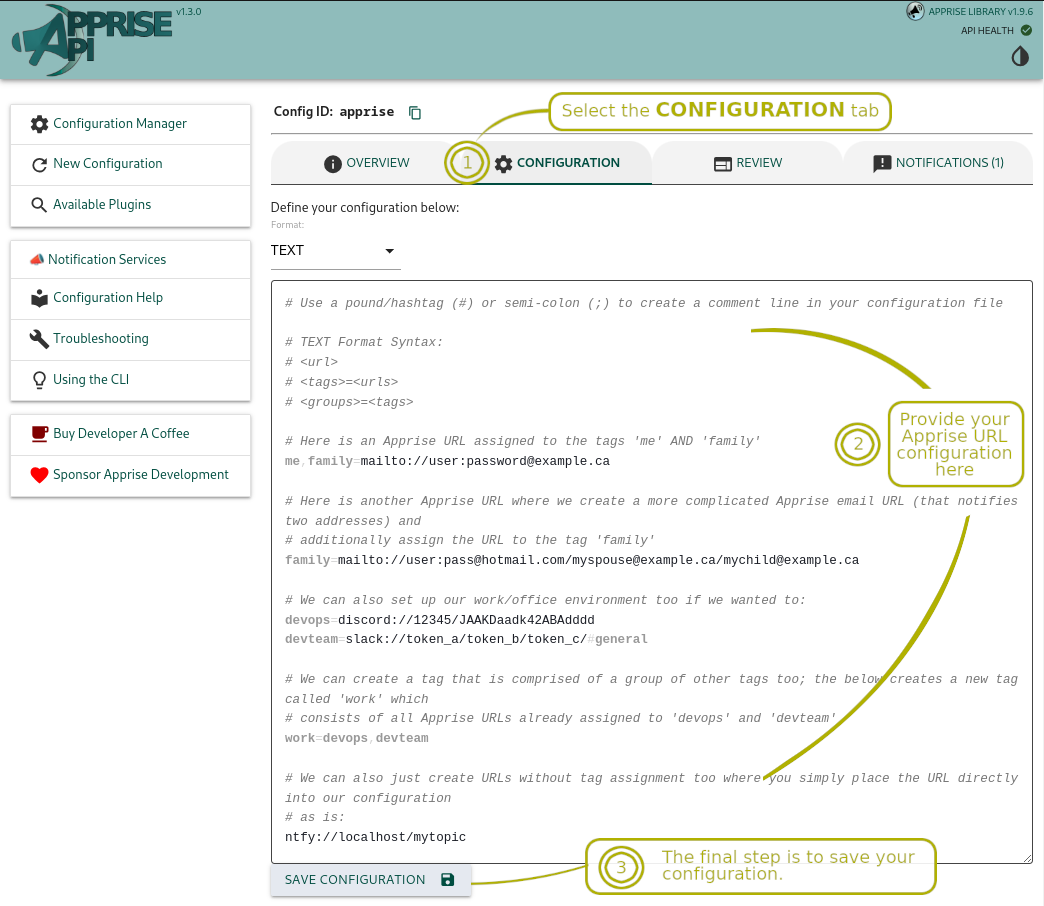
There is a small built-in Configuration Manager that can be optionally accessed through your web browser allowing you to create and save as many configurations as you'd like. Each configuration is differentiated by a unique Configuration ID that you decide on: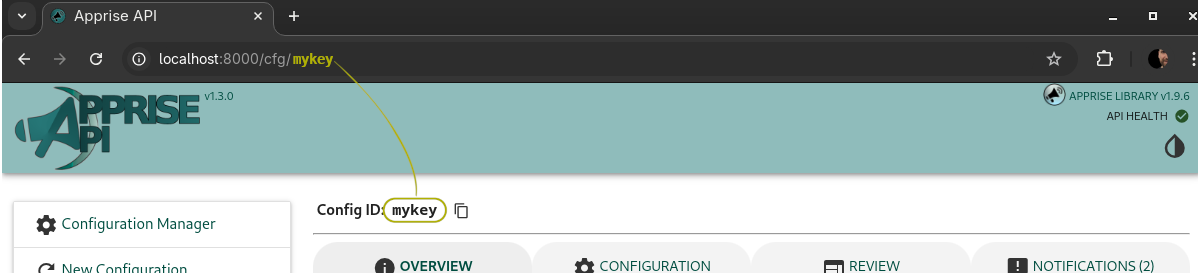
Below is a screenshot of the review tab where you can preview what Apprise URL(s) got loaded from your defined configuration. It also allows you to view the tags associated with them (if any). Should you chose to send a test notification via this API, you can select the tags in advance you wish to target from here.
With configuration in place, you'll be able to use the Notification tab to send a test message to one or more of the services you defined in your configuration. You can also select from the tags (if any) you pre-assigned to your URLs defined. If you did not define any tags with you configured URLs, then you do not need to identify any here. You can use the tag
all to notify all of your services regardless of what tag had otherwise been assigned to them (if any at all).
At the end of the day, the GUI just simply offers a user friendly interface to the same API developers can directly interface with if they wish to.
Apprise Mobile (Android)

Apprise Mobile is the Android companion app for Apprise API. Send a message, photo, or file to one destination, a group, or every destination you've configured. The app requires access to your running Apprise API server; it is not a standalone notification service.
Get Apprise Mobile on Google Play — install it on your Android device, then connect it to your Apprise API server.
| Dashboard | URL Builder | Delivery Report |
|---|---|---|
 |
 |
 |
Connecting to Your Server
Once the app is installed, open the Configuration Manager in your browser and reveal the Apprise Mobile Quick Setup QR code on any configuration you've saved. Scanning it from the app adds your server and loads that configuration in one step—no typing URLs on a phone keyboard.Visit the Apprise Mobile page for more details, screenshots, and the app's privacy policy and terms.
Google Play and the Google Play logo are trademarks of Google LLC.
Installation
The following options should allow you to access the API at:http://localhost:8000/ from your browser.Using dockerhub you can do the following:
# Retrieve container
docker pull caronc/apprise:latest

# Start it up:
# /config is used for a spot to write all of the configuration files
#         generated through the API. The internal persistent store lives
#         under /config/store so a single /config volume is sufficient.
# /plugin is used for a location you can add your own custom apprise plugins.
#         You do not have to mount this if you don't intend to use it.
# /attach is used for file attachments
# /tmp    Temporary files, suitable for `tmpfs` in hardened deployments.
#
# The below example sets a the APPRISE_WORKER_COUNT to a small value (overriding
# a full production environment setting).  This may be all that is needed for
# a light-weight self hosted solution.
#
# setting APPRISE_STATEFUL_MODE to simple allows you to map your defined {key}
# straight to a file found in the `/config` path.  In simple home configurations
# this is sometimes the ideal expectation.
#
# Set your User ID or Group ID if you wish to override the default of 1000
# in the below example, we make sure it runs as the user we created the container as

docker run --name apprise \
   -p 8000:8000 \
   --user "$(id -u):$(id -g)" \
   -v /path/to/local/config:/config \
   -v /path/to/local/plugin:/plugin \
   -v /path/to/local/attach:/attach \
   -e APPRISE_STATEFUL_MODE=simple \
   -e APPRISE_WORKER_COUNT=1 \
   -e APPRISE_DEFAULT_FORMAT=text \
   -e TZ=America/Toronto \
   -d caronc/apprise:latest
You can also choose to build yourself a custom version after checking out the source code. This is sometimes useful when you want to make a change to the source code and try it out. A common change one might make is to update the Dockerfile to point to the master branch of Apprise instead of using the stable version. The image build compiles the Apprise translations for you, so this works even when Apprise comes straight from git.
# Setup your environment the way you like
docker build -t apprise/local:latest -f Dockerfile .

# Set up a directory you wish to store your configuration in:
mkdir -p /etc/apprise

# Launch your instance
docker run --name apprise \
   -p 8000:8000 \
   --user "$(id -u):$(id -g)" \
   -e APPRISE_STATEFUL_MODE=simple \
   -e APPRISE_WORKER_COUNT=1 \
   -e APPRISE_DEFAULT_FORMAT=text \
   -e TZ=America/Toronto \
   -v /etc/apprise:/config \
   -d apprise/local:latest

# Change your paths to what you want them to be, you may also wish to
# just do the following:
mkdir -p config
docker run --name apprise \
   -p 8000:8000 \
   --user "$(id -u):$(id -g)" \
   -e APPRISE_STATEFUL_MODE=simple \
   -e APPRISE_WORKER_COUNT=1 \
   -e APPRISE_DEFAULT_FORMAT=text \
   -e TZ=America/Toronto \
   -v ./config:/config \
   -d apprise/local:latest
Docker Compose Examples
A minimaldocker-compose.yml might look like this:services:
apprise:
image: caronc/apprise:latest
container_name: apprise
ports:
- "8000:8000"
environment:
APPRISE_STATEFUL_MODE: simple
APPRISE_WORKER_COUNT: "1"
APPRISE_DEFAULT_FORMAT: "text"
TZ: America/Toronto
volumes:
- ./config:/config
- ./plugin:/plugin
- ./attach:/attachFor production deployments, do not use
docker-compose.override.yml.
Deploy using only docker-compose.yml, so the container uses the immutable image and its bundled static assets.
# Pre-create the paths you will mount to
mkdir -p attach config plugin

# Ensure you've got the latest image:
docker pull caronc/apprise:latest

# Ignore override, use only the base file
PUID=$(id -u) PGID=$(id -g) \
   docker compose -f docker-compose.yml up -d
A more hardened configuration might look like:
services:
  apprise:
    image: caronc/apprise:latest
    container_name: apprise
    user: "${PUID:-1000}:${PGID:-1000}"

    # Hardened runtime
    read_only: true
    security_opt:
      - no-new-privileges:true
    cap_drop:
      - ALL

    ports:
      - "8000:8000"

    environment:
      APPRISE_STATEFUL_MODE: simple
      APPRISE_WORKER_COUNT: "1"
      APPRISE_DEFAULT_FORMAT: "text"
      TZ: America/Toronto

    # Persistent state
    volumes:
      - ./config:/config
      - ./plugin:/plugin
      - ./attach:/attach

    # Ephemeral runtime and temp files
    tmpfs:
      - /tmp
Dockerfile Details
The following architectures are supported:amd64, arm/v7, and arm64. The following tags can be used:latest: Points to the latest stable build.edge: Points to the last push to the master branch.
Container Runtime Model and Filesystem Layout
The Apprise API container is designed to be “container native”:- All logs (nginx, gunicorn, supervisord) are written to
stdoutandstderr.
/var/log. You should use docker logs,
kubectl logs, or your orchestrator’s log collection instead.- Nginx and the application use
/tmpfor all temporary files
- Runtime state such as pid and socket information is written under
/tmp/apprise.
Persistent or writable locations are:
/config– configuration created and managed through the API or UI.
/config/store./attach– uploaded attachments./plugin– custom Apprise plugins./tmp– temporary files, suitable fortmpfsin hardened deployments.
For simple deployments you only need to mount persistent storage for
/config, /attach, if you want that data to survive container restarts. You only require /plugin if you intend to add some custom plugins into your Apprise instance for others to use.Stateless
/notify usage can still use /attach for file uploads and optionally /plugin for custom plugins. In those cases you can back them with either persistent volumes or ephemeral storage, depending on your needs.Apprise URLs
📣 In order to trigger a notification, you first need to define one or more Apprise URLs to support the services you wish to leverage. VisitAPI Details
Health Checks
You can perform status or health checks on your server configuration by accessing/status.| Path | Method | Description | |------------- | ------ | ----------- | |
/status | GET | Simply returns a server status. The server http response code is a 200 if the server is working correctly and a 417 if there was an unexpected issue. You can set the Accept header to application/json or text/plain for different response outputs.Below is a sample of just a simple text response:
# Request a general text response
# Output will read `OK` if everything is fine, otherwise it will return
# one or more of the following separated by a comma:
#  - ATTACH_PERMISSION_ISSUE: Can not write attachments (likely a permission issue)
#  - CONFIG_PERMISSION_ISSUE: Can not write configuration (likely a permission issue)
#  - STORE_PERMISSION_ISSUE: Can not write to persistent storage (likely a permission issue)
curl -X GET http://localhost:8000/status
Below is a sample of a JSON response:
curl -X GET -H "Accept: application/json" http://localhost:8000/status{
"attach_lock": false,
"config_lock": false,
"stateful_enabled": true,
"stateless_enabled": true,
"degraded": false,
"max_attachments": 6,
"attach_size": 209715200,
"status": {
"persistent_storage": true,
"can_write_config": true,
"can_write_attach": true,
"details": ["OK"]
}
}- The
attach_lockalways cross references if theAPPRISE_ATTACH_SIZEon whether or not it is0(zero) or less. config_lockreports whether this caller may view configuration content. It
false for an administrator who can bypass the lock.stateful_enabledandstateless_enabledreport the server-wide mode
degradedistruewhen both notification modes are disabled.max_attachmentsis the activeAPPRISE_MAX_ATTACHMENTSvalue.attach_sizeis the activeAPPRISE_ATTACH_SIZEvalue.- The
status.persistent_storagedefines if the persistent storage is enabled or not. If the environment variableAPPRISE_STORAGE_PATHis empty, this value will always readfalseand it will not impact thestatus.details - The
status.can_write_configdefines if the configuration directory is writable or not. If the environment variableAPPRISE_STATEFUL_MODEis set todisabled, this value will always readfalseand it will not impact thestatus.details - The
status.can_write_attachdefines if the attachment directory is writable or not. If the environment variableAPPRISE_ATTACH_SIZE. This value will always readfalseand it will not impact thestatus.details. - The
status.detailsidentifies the overall status. If there is more then 1 issue to report here, they will all show in this list. In a working orderly environment, this will always be set toOKand the http response type will be200.
Stateless Solution
Some people may wish to only have a sidecar solution that does require use of any persistent storage. The following API endpoint can be used to directly send a notification of your choice to any of the supported services by Apprise without any storage based requirements:| Path | Method | Description | |------------- | ------ | ----------- | |
/notify/ | POST | Sends one or more notifications to the URLs identified as part of the payload, or those identified in the environment variable APPRISE_STATELESS_URLS. Payload Parameters
📌 urls: One or more URLs identifying where the notification should be sent to. If this field isn't specified then it automatically assumes the
settings.APPRISE_STATELESS_URLS value or APPRISE_STATELESS_URLS environment variable.📌 body: Your message body. This is a required field.
📌 title: Optionally define a title to go along with the body.
📌 type: Defines the message type you want to send as. The valid options are
info, success, warning, and failure. If no type is specified then info is the default value used.📌 format: Optionally identify the text format of the data you're feeding Apprise. The valid options are
text, markdown, html. If nothing is specified, no format is applied and the content is passed through untouched.📌 Add
?stream=yes (or Accept: text/event-stream) for progress while notification work is still running — see Live Progress Streaming below.This path does not work if
APPRISE_STATELESS_MODE is set to disabled.Stateless
/notify calls do not require /config, but they do leverage /attach for file uploads (assuming APPRISE_ATTACH_SIZE is not set to 0 (zero). You can optionally use /plugin if you have custom Apprise plugins you wish to use.When authentication is enabled, an administrator may call
/notify directly. A configuration user must send explicit urls, their matching X-Apprise-Config-ID header, and credentials for a configuration with user access. The header authorizes the caller but does not replace those URLs. The locked, public, and disabled access modes cannot send stateless notifications. For compatibility with Apprise API v2 clients, a header-bearing /notify request without urls remains a stateful send through the saved configuration.Here is a stateless example of how one might send a notification (using
/notify/):# Send your notifications directly
curl -X POST -d 'urls=mailto://user:pass@gmail.com&body=test message' \
http://localhost:8000/notify
# Send a notification with an attachment:
curl -X POST \
-F 'urls=mailto://user:pass@gmail.com' \
-F 'body=test message' \
-F attach=@Screenshot-1.png \
http://localhost:8000/notify
# Send multiple attachments; just make sure the attach keyword is unique:
curl -X POST \
-F 'urls=mailto://user:pass@gmail.com' \
-F 'body=test message' \
-F attach1=@Screenshot-1.png \
-F attach2=@/my/path/to/Apprise.doc \
http://localhost:8000/notify
# This example shows how you can place the body among other parameters
# in the GET parameter and not the payload as another option.
curl -X POST -d 'urls=mailto://user:pass@gmail.com&body=test message' \
-F @/path/to/your/attachment \
http://localhost:8000/notify
# The body is not required if an attachment is provided:
curl -X POST -d 'urls=mailto://user:pass@gmail.com' \
-F @/path/to/your/attachment \
http://localhost:8000/notify
# Send your notifications directly using JSON
curl -X POST -d '{"urls": "mailto://user:pass@gmail.com", "body":"test message"}' \
-H "Content-Type: application/json" \
http://localhost:8000/notify
# attach= is an alias of attachment=
# Send a notification with a URL based attachment
curl -X POST \
-F 'urls=mailto://user:pass@gmail.com' \
-F attach=https://raw.githubusercontent.com/caronc/apprise/master/apprise/assets/themes/default/apprise-logo.png \
http://localhost:8000/notifyYou can also send notifications that are URLs. Apprise will download the item so that it can send it along to all end points that should be notified about it.
# Use the 'attachment' parameter and send along a web request
curl -X POST \
    -F 'urls=mailto://user:pass@gmail.com' \
    -F attachment=https://i.redd.it/my2t4d2fx0u31.jpg \
    http://localhost:8000/notify

# To send more then one URL, the following would work:
curl -X POST \
    -F 'urls=mailto://user:pass@gmail.com' \
    -F attachment=https://i.redd.it/my2t4d2fx0u31.jpg \
    -F attachment=https://path/to/another/remote/file.pdf \
    http://localhost:8000/notify

# Finally feel free to mix and match local files with external ones:
curl -X POST \
    -F 'urls=mailto://user:pass@gmail.com' \
    -F attachment=https://i.redd.it/my2t4d2fx0u31.jpg \
    -F attachment=https://path/to/another/remote/file.pdf \
    -F @/path/to/your/local/file/attachment \
    http://localhost:8000/notify
Persistent (Stateful) Storage Solution
You can pre-save all of your Apprise configuration and/or set of Apprise URLs and associate them with a{KEY} of your choosing. Once set, the configuration persists for retrieval by the apprise CLI tool or any other custom integration you've set up. The built in website with comes with a user interface that you can use to leverage these API calls as well. Those who wish to build their own application around this can use the following API end points:Stateful endpoints also accept
X-Apprise-Config-ID. This keeps the Config ID out of the URL. On /status it selects that ID's login. On /notify, a request without urls selects the saved configuration; explicit urls make it stateless and use the ID only for authentication. The /cfg listing does not accept it.If both the URL and header contain a key, the header wins. Invalid headers return
400. Existing URL-based requests remain supported.The
/cfg list requires APPRISE_STATEFUL_MODE=simple and is available by default; set APPRISE_ADMIN=no to turn it off. When APPRISE_CONFIG_LOCK is enabled, the list also requires an authenticated administrator.| Path | Method | Description | |------------- | ------ | ----------- | |
/add/{KEY} | POST | Saves Apprise Configuration (or set of URLs) to the persistent store.Payload Parameters
📌 urls: Define one or more Apprise URL(s) here. Use a comma and/or space to separate one URL from the next.
📌 config: Provide the contents of either a YAML or TEXT based Apprise configuration.
📌 format: This field is only required if you've specified the config parameter. Used to tell the server which of the supported (Apprise) configuration types you are passing. Valid options are text and yaml. Under
APPRISE_CONFIG_LOCK, this requires an authenticated administrator.
| /del/{KEY} | POST | Removes Apprise Configuration from the persistent store. Under APPRISE_CONFIG_LOCK, this requires an authenticated administrator.
| /move/{KEY} | POST | Moves the configuration stored at {KEY} to a new Config ID.Payload Parameters
📌 to: The destination Config ID. It must not already have a configuration. Under
APPRISE_CONFIG_LOCK, this requires an authenticated administrator.
| /cfg/{KEY} | POST | Returns the Apprise Configuration from the persistent store. This can be directly used with the Apprise CLI and/or the AppriseConfig() object (see here for details). Under APPRISE_CONFIG_LOCK, this requires an authenticated administrator. This is an alias of /get/{KEY} (identified next).
| /get/{KEY} | POST | Returns the Apprise Configuration from the persistent store. This can be directly used with the Apprise CLI and/or the AppriseConfig() object (see here for details). Under APPRISE_CONFIG_LOCK, this requires an authenticated administrator. This is also provided via /cfg/{KEY} as an alias.
| /notify/{KEY} | POST | Sends notification(s) through a saved configuration. disabled configurations are available only to the administrator.Payload Parameters
📌 body: Your message body.
📌 title: An optional title.
📌 type:
info, success, warning, or failure; defaults to info.📌 tag: Optionally select destinations by tag. It is required for
locked and public access, where all is rejected.📌 format: Optionally use
text, markdown, or html.📌 Add
?stream=yes (or Accept: text/event-stream) for live progress — see Live Progress Streaming.📌 template: Values for a configuration written with
${NAME} markers. Send a JSON object ("template": {"api_key": "..."}) or one form field per name (template[api_key]=...).
| /json/urls/{KEY} | GET | Returns the URLs and tags associated with the key. Each URL lists its template names. With privacy=0, each name carries its configuration default (or null). With privacy=1, URL secrets are hidden and every name is null. Under APPRISE_CONFIG_LOCK, an authenticated administrator is required and every name is null.
| /status/{KEY} | GET | Returns /status, protected by the key's credentials. Its config_lock value includes the key's access mode and is relative to the authenticated caller (false for a global administrator that can bypass the lock).
| /auth/{KEY} | GET | Opens the access editor, or returns the mode, access, and username as JSON. Passwords are never returned.
| /auth/{KEY} | POST | Sets credentials and access. Administrators may change access; configuration users may change their password.
| /auth/{KEY} | DELETE | Removes the key's Basic Auth without removing its configuration. Global administrator credentials are required. /del/{KEY} removes both.
| /details | GET | Set the Accept Header to application/json and retrieve a JSON response object that contains all of the supported Apprise URLs. See here for more details
| /metrics | GET | Prometheus endpoint for basic Metrics Collection & Analysis and/or Observability.As an example, the
/json/urls/{KEY} response might return something like this:{
"tags": ["devops", "admin", "me"],
"urls": [
{
"url": "slack://TokenA/TokenB/TokenC",
"tags": ["devops", "admin"]
},
{
"url": "discord://WebhookID/WebhookToken",
"tags": ["devops"]
},
{
"url": "mailto://user:pass@gmail.com",
"tags": ["me"]
}
]
}You can pass
privacy=1 to /json/urls/{KEY} to hide passwords and secret
tokens. The template section of each URL still lists every name it uses, but
each is null. With privacy=0, each name maps to its configuration default,
or null when none was declared. Server environment values, and whether they
exist, are never returned. Use tag= to filter results with a comma-separated
set of tags; if omitted, tag=all is used.When
APPRISE_CONFIG_LOCK is set, only an authenticated administrator may use /json/urls/{KEY}, and every template name is null. Other callers receive 403 without revealing saved URLs or tags. Non-admin notification callers must provide a specific tag; all is rejected.Here is an example using
curl as to how someone might send a notification to everyone associated with the tag abc123 (using /notify/{key}):# Send notification(s) to a {key} defined as 'abc123'
curl -X POST -d "body=test message" \
http://localhost:8000/notify/abc123
# Here is the same request but using JSON instead:
curl -X POST -d '{"body":"test message"}' \
-H "Content-Type: application/json" \
http://localhost:8000/notify/abc123
# Send attachments:
curl -X POST \
-F 'urls=mailto://user:pass@gmail.com' \
-F 'body=test message' \
-F attach1=@Screenshot-1.png \
-F attach2=@/my/path/to/Apprise.doc \
http://localhost:8000/notify/abc123
# attach= is an alias of attachment=
# Send a notification with a URL based attachment
curl -X POST \
-F 'urls=mailto://user:pass@gmail.com' \
-F attach=https://raw.githubusercontent.com/caronc/apprise/master/apprise/assets/themes/default/apprise-logo.png \
http://localhost:8000/notify/abc123🏷️ Leveraging tagging allows you to associate one or more tags (or categories) with your Apprise URLs. By doing this, notifications only need to be referred to by their easy to remember notify tag name such as
devops, admin, family, etc. You can very easily group more than one notification service under the same tag allowing you to notify a group of services at once. This is accomplished through configuration files (documented here) that can be saved to the persistent storage previously associated with a {KEY}.# Send notification(s) to a {KEY} defined as 'abc123'
# but only notify the URLs associated with the 'devops' tag
curl -X POST -d 'tag=devops&body=test message' \
http://localhost:8000/notify/abc123
# Here is the same request but using JSON instead:
curl -X POST -d '{"tag":"devops", "body":"test message"}' \
-H "Content-Type: application/json" \
http://localhost:8000/notify/abc123Template Values
A saved YAML configuration can leave a value out of a URL and have it filled in when the notification is sent. This lets you store the configuration without the secrets in it, or let the caller fill in a value chosen by the author.Write
${NAME} where the value belongs and declare every name in a template:
section:template:
# A default is used unless the notification supplies a value
smtp_host: smtp.example.com
# No default: the notification or server environment must fill this name
api_key:
urls:
- sendgrid://${API_KEY}:noreply@example.com/you@example.com:
- tag: alertsSend the values along with the notification, as a JSON object:
curl -X POST -H "Content-Type: application/json" \
    -d '{"tag":"alerts", "body":"test message",
         "template": {"api_key": "your-secret-key"}}' \
    http://localhost:8000/notify/abc123
...or as one form field per name:
curl -X POST \
    -F "tag=alerts" \
    -F "body=test message" \
    -F "template[api_key]=your-secret-key" \
    http://localhost:8000/notify/abc123
Apprise uses the first value it finds: the one sent with the notification, then the default in the
template: section, then APPRISE_TEMPLATE_<NAME> from the
server's own environment. Environment values are never shown to a caller. A URL
still missing a value is skipped and the response reports 424 without saying
which name it was. The Notifications and Review tabs prompt for the
names a configuration needs, and /json/urls/{KEY} reports them to other
clients.:warning: A variable placed in a URL can change any part of it, including its host. A named YAML setting is safer when a less-trusted caller should control only one option, which matters most for
public and locked configurations.Set
APPRISE_ALLOW_TEMPLATES=no to switch the feature off; ${NAME} is then
ordinary text.For the full details -- where each value may be placed, what the API returns, and how to fill in markers from your own client -- see appriseit.com.
Tagging
Tagging is one of the things that makes Apprise super handy and easy to use. Not only can you group one or more notifications together (all sharing the same tag), but you can assign multiple tags to the same URL and trigger it through crafted and selected tag expressions.| Example | Effect | | --------------------- | ------------------------------ | | TagA | TagA | TagA, TagB | TagA OR TagB | TagA TagC, TagB | (TagA AND TagC) OR TagB | TagB TagC | TagB AND TagC
# 'AND' Example
# Send notification(s) to a {KEY} defined as 'abc123'
# Notify the URLs associated with the 'devops' and 'after-hours' tag
# The 'space' acts as an 'AND' You can also use '+' character (in spot of the
# space to achieve the same results)
curl -X POST -d '{"tag":"devops after-hours", "body":"repo outage"}' \
    -H "Content-Type: application/json" \
    http://localhost:8000/notify/abc123


# 'OR' Example
# Send notification(s) to a {KEY} defined as 'def456'
# Notify the URLs associated with the 'dev' OR 'qa' tag
# The 'comma' acts as an 'OR'.  The whitespace around the comma is ignored (if
# defined) You can also use '+' character (in spot of the space to achieve the
# same results)
curl -X POST -d '{"tag":"dev, qa", "body":"bug #000123 is back :("}' \
    -H "Content-Type: application/json" \
    http://localhost:8000/notify/def456


# 'AND' and 'OR' Example
# Send notification(s) to a {KEY} defined as 'projectX'
# Notify the URLs associated with the 'leaders AND teamA' AND additionally
# the 'leaders AND teamB'.
curl -X POST -d '{"tag":"leaders teamA, leaders teamB", "body":"meeting now"}' \
    -H "Content-Type: application/json" \
    http://localhost:8000/notify/projectX
Live Progress Streaming
Both notification endpoints can stream progress as each service is notified. Use?stream=yes or send Accept: text/event-stream.Normal responses still wait for notification work to finish, but send retained logs one entry at a time. This avoids rebuilding a large result in memory. Live progress streaming sends logs while notification work is still running.
The response contains
log events followed by one result event. An unexpected processing failure produces an error event instead. See the StreamEvent schema in swagger.yaml for the event fields.Log Detail
SendX-Apprise-Log-Level to choose how much detail comes back (trace,
debug, info, warning, error, or critical). For saved configurations,
debug and trace require administrator privileges or user access. Calls
using locked, public, or disabled access are limited to info. Stateless
calls allow every level because the caller provides their own URLs.Slow clients keep up to 2 MB in memory before using automatically cleaned temporary storage, which holds up to 256 MB by default. During normal operation, events remain ordered and are not omitted while the client stays connected.
If the storage limit is reached or temporary storage fails, notification delivery continues and the stream reports an
ERROR log asking the caller to contact the server administrator. Later logs continue whenever space becomes available.curl -N -X POST -d '{"tag":"devops", "body":"repo outage"}' \
-H "Content-Type: application/json" \
"http://localhost:8000/notify/abc123?stream=yes"event: log
data: {"level": "INFO", "asctime": "2025-01-01 12:00:00,000", "message": "Sent to Telegram", "service": "Telegram"}
event: result
data: {"status": "SUCCESS"}API Response Codes
| HTTP Code | Name | Effect |
|---|---|---|
| 200 | OK | The request succeeded. |
| 204 | No Content | Nothing was found to retrieve or remove (/get, /cfg, /json/urls or /del). The response has no body. |
| 302 | Found | The Web interface redirected the browser after a login, logout, or configuration selection. |
| 400 | Bad Request | The request contained an invalid key, payload, field, format, tag, or recursion header, or a stateless /notify had no valid URLs to send to. |
| 401 | Unauthorized | Required Basic Auth credentials were missing or invalid. |
| 403 | Forbidden | The server mode or caller's access level denied the operation. |
| 404 | Not Found | The route or requested configuration does not exist, including a /notify/{KEY} with no saved configuration. Strict mode returns this for unknown routes. |
| 405 | Method Not Allowed | The route does not support the request method. See the response's Allow header. |
| 406 | Not Acceptable | A recursion limit or another server rule rejected the operation. |
| 409 | Conflict | A configuration move targeted an existing Config ID. |
| 413 | Content Too Large | Nginx rejected a body larger than the route or server upload limit. |
| 414 | URI Too Long | Nginx rejected a request target that was too long. |
| 417 | Expectation Failed | The health check found a blocking configuration or permission problem. |
| 421 | Misdirected Request | A Web interface page was requested while APPRISEAPIONLY=yes. |
| 424 | Failed Dependency | At least one notification failed, no requested tag matched, or the configuration store could not complete a dependent operation. |
| 429 | Too Many Requests | Nginx temporarily rate-limited the request. Packaged deployments return Retry-After: 60. |
| 431 | Request Header Fields Too Large | Django rejected a JSON payload above APPRISEUPLOADMAXMEMORYSIZE. |
| 500 | Internal Server Error | The server could not save or load data, or encountered an unexpected I/O error. |
| 502 | Bad Gateway | Nginx could not obtain a valid response from the application worker. |
| 503 | Service Unavailable | The application worker is temporarily unavailable. |
| 504 | Gateway Timeout | The application worker did not respond before the proxy timeout. |
API Notes
{KEY}must be 1-128 alphanumeric characters in length. In addition to this, the underscore (_) and dash (-) are also accepted.
sha1, sha512, uuid, etc to secure shared namespaces if you wish to open your platform to others. Or keep it simple in a controlled environment and just use the default string apprise as your key (and as illustrated in the examples above). You can override this default value by setting the APPRISE_DEFAULT_CONFIG_ID(see below).- Specify the
Content-Typeofapplication/jsonto use the JSON support otherwise the default expected format isapplication/x-www-form-urlencoded(whether it is specified or not). - Authentication is disabled by default. Set
APPRISE_AUTH_REQUIRED=yesto enable it; see Authentication. - There are no additional dependencies (such as database requirements, etc) should you choose to use the optional persistent store (mounted as
/config).
Environment Variables
The use of environment variables allow you to provide overrides to default settings.| Variable | Description | |--------------------- | ----------- | |
PUID | The User ID you wish the Apprise services under the hood to run as when the container starts as root and no explicit --user / user: has been set. The default is 1000 if not otherwise specified.
| PGID | The Group ID used in the same scenario as PUID. If the container is started with an explicit --user or user:, that value takes precedence and PUID / PGID are not consulted for process privileges.
| IPV4_ONLY | Force an all IPv4 only environment (default supports both IPV4 and IPv6). If IPV6_ONLY is also set, this is treated as an invalid, ambiguous configuration and the startup script will exit with an error.
| IPV6_ONLY | Force an all IPv6 only environment (default supports both IPv4 and IPv6). If IPV4_ONLY is also set, this is treated as an invalid, ambiguous configuration and the startup script will exit with an error.
| HTTP_PORT | Force the default listening port to be something other than 8000 within the Docker container.
| APPRISE_ALLOW_TEMPLATES | Pass template support directly to Apprise. Defaults to yes, matching the CLI. Set it to no to ignore template: sections and APPRISE_TEMPLATE_<NAME>, leave ${NAME} as ordinary text, and skip template-specific checks. Only the server operator controls this setting.
| APPRISE_TEMPLATE_<NAME> | Fills a ${NAME} in saved YAML only when the notification supplies no value and the configuration has no default. Blank values are ignored. |
| STRICT_MODE | Applicable only to container deployments. Set this to yes to allow only known Apprise routes and add tighter authentication rate limits. Unknown routes return 404, unsupported methods return 405, and rate-limited requests return 429, allowing reverse proxies and other security tooling to handle them reliably. The default is no.
| APPRISE_CONNECTION_TIMEOUT | How long the container waits for activity from a live notification stream, in seconds. Accepts 30 to 3600 and defaults to 600 (10 minutes). This does not limit the total notification time.
| APPRISE_DEFAULT_THEME | Can be set to light or dark; it defaults to light if not otherwise provided. The values are case-insensitive, and l or d may be used as shorthand. The theme can be toggled from within the website as well.
| APPRISE_DEFAULT_CONFIG_ID | Defaults to apprise. This is the presumed configuration ID you always default to when accessing the configuration manager via the website.
| APPRISE_CONFIG_DIR | Defines an (optional) persistent store location of all configuration files saved. By default:- Configuration is written to the
apprise_api/var/config directory when just using the Django manage runserver script. However for the path for the container is /config.
| APPRISE_STORAGE_DIR | Defines an (optional) persistent store location of all cache files saved. By default persistent storage is written into the <APPRISE_CONFIG_DIR>/store.
| APPRISE_STORAGE_MODE | Defines the storage mode to use. If no APPRISE_STORAGE_DIR is identified, then this is set to memory in all circumtances regardless what it might otherwise be set to. The possible options are:📌 auto: This is also the default. Writes cache files on demand only.
📌 memory: Persistent storage is disabled; local memory is used for simple internal references. This is effectively the behavior of Apprise of versions 1.8.1 and earlier.
📌 flush: A bit more i/o intensive then
auto. Content is written to disk constantly if changed in anyway. This mode is still experimental.Values are case-insensitive;
a, m, and f may be used as shorthand.
| APPRISE_STORAGE_UID_LENGTH | Defines the unique key lengths used to identify an Apprise URL. By default this is set to 8. Value can not be set to a smaller value then 2 or larger then 64.
| APPRISE_STATELESS_STORAGE | Allow stateless URLs (in addition to stateful) to also leverage persistent storage. This defaults to no and can however be set to yes by simply defining the global variable as such.
| APPRISE_STORAGE_PRUNE_DAYS | Age in days before storeprune removes persistent notification state. Defaults to 30.
| APPRISE_AUTH_PRUNE_SECONDS | Age in seconds before authprune removes a lock that has no configuration. Defaults to 2592000 (30 days). Locks with configuration are retained.
| APPRISE_PRUNE_INTERVAL_SECONDS | How often the container prunes persistent state and unused authentication locks. Defaults to 86400 (daily).
| APPRISE_PRUNE_TIMEOUT_SECONDS | Maximum time allowed for each automatic prune run. Defaults to 28800 (8 hours) and is shortened automatically when it is not below the prune interval.
| APPRISE_PRUNE_ENABLED | Set to no to stop automatic pruning. Manual commands remain available. Defaults to yes.
| APPRISE_ATTACH_DIR | The directory the uploaded attachments are placed in. By default:- Attachments are written to the
apprise_api/var/attach directory when just using the Django manage runserver script. However for the path for the container is /attach.
| APPRISE_ATTACH_SIZE | Over-ride the attachment size (defined in MB). By default it is set to 200 (Megabytes). You can set this up to a maximum value of 500 which is the restriction in place for NginX (internal hosting ervice) at this time. If you set this to zero (0) then attachments will not be passed along even if provided.
| APPRISE_UPLOAD_MAX_MEMORY_SIZE | Over-ride the in-memory accepted payload size (defined in MB). By default it is set to 3 (Megabytes). There is no reason the HTTP payload (excluding attachments) should exceed this limit. This value is only configurable for those who have edge cases where there are exceptions to this rule.
| APPRISE_CONFIG_MAX_LENGTH | Over-ride the maximum accepted configuration payload length (defined in KB). The value provided (in KB) is internally converted to bytes and can never exceed APPRISE_UPLOAD_MAX_MEMORY_SIZE (defined in MB). The default is 512 (KB).
| APPRISE_STREAM_MEMORY_SIZE | Memory used by each live stream before waiting logs move to disk, in MB. The same value limits memory used by completed result logs. The default is 2. Set it to 0 to use disk immediately when disk storage is enabled.
| APPRISE_STREAM_DISK_SIZE | Temporary disk allowance for each live stream and, separately, each completed result, in MB. The default is 256. Set it to 0 to disable temporary disk storage and keep result logs in memory. Live streams also remain in memory when the memory size is greater than 0; when both sizes are 0, live-stream backlog retention is disabled.
| APPRISE_STREAM_WORKER_COUNT | Maximum streamed notifications that can actively send at the same time. Additional streams wait according to APPRISE_STREAM_QUEUE_SIZE, then receive 503 when that queue is full. The default is 4 per application process and should suit most installations.
| APPRISE_STREAM_QUEUE_SIZE | Additional live streams that may remain connected while waiting or finishing their responses. Further streams receive 503 with a Retry-After header. The default is 8 per application process.
| APPRISE_STATELESS_URLS | For a non-persistent solution, you can take advantage of this global variable. Use this to define a default set of Apprise URLs to notify when using API calls to /notify. If no {KEY} is defined when calling /notify then the URLs defined here are used instead. By default, nothing is defined for this variable.
| APPRISE_STATEFUL_MODE | This can be set to the following possible modes:📌 hash: This is also the default. It stores the server configuration in a hash formatted that can be easily indexed and compressed.
📌 simple: Configuration is written straight to disk using the
{KEY}.cfg (if TEXT based) and {KEY}.yml (if YAML based).📌 disabled: Straight up deny any read/write queries to the servers stateful store. Effectively turn off the Apprise Stateful feature completely.
Values are case-insensitive. |
APPRISE_STATELESS_MODE | Controls stateless /notify calls:📌 enabled: Accept stateless notifications. This is the default.
📌 disabled: Reject stateless notifications. If stateful mode is also disabled,
/status reports degraded.
| APPRISE_CONFIG_LOCK | Hides configuration content and management from regular users. An authenticated administrator retains full access. Without authentication, management operations are denied. Stateful and stateless notifications continue to work normally, including optional stateful tag selection. Defaults to no.
| APPRISE_AUTH_REQUIRED | Enables built-in authentication when set to yes. Defaults to no. When disabled, APPRISE_USER, APPRISE_PASSWORD, and saved configuration logins are ignored. See Authentication.
| APPRISE_USER | Optional administrator username used only when APPRISE_AUTH_REQUIRED=yes. It requires APPRISE_PASSWORD; colons are not allowed.
| APPRISE_PASSWORD | Optional administrator password used only when APPRISE_AUTH_REQUIRED=yes. It may be used without a username. Leave it unset to run authentication without an administrator account.
| APPRISE_BASIC_AUTH_REALM | Label shown in Basic Auth prompts. Defaults to Apprise API; use a different label for each instance sharing a host.
| APPRISE_WEB_AUTH_SECRET | Optional key used to sign browser logins. When unset, a random key is created once and saved as .web_auth_secret in APPRISE_CONFIG_DIR. Changing it signs users out without moving hash-mode configurations.
| APPRISE_TRUSTED_ORIGINS | Origins allowed to make browser writes, separated by commas. Use scheme://host[:port], such as https://apprise.example.com. HTTPS deployments should set this because bundled nginx does not forward the original scheme (issue #275).
| APPRISE_ADMIN | Shows the configuration list when APPRISE_STATEFUL_MODE=simple. Authentication permissions still decide who may use it. Defaults to yes; set it to no to hide the list.
| APPRISE_INTERPRET_EMOJIS | Override the Apprise interpret-emojis setting. This defaults to none (not set), but can be enforced to no or yes.
| APPRISE_HTTP_REDIRECTS | By default, Apprise follows HTTP 3xx redirects, matching the behaviour of the underlying requests library. Set to no to disable redirect following globally across all plugins without having to add redirect=no to every individual URL. Individual URLs can always override this with ?redirect=yes or ?redirect=no regardless of this setting. This defaults to yes.
| APPRISE_DEFAULT_FORMAT | Optional text, html, or markdown default for API requests that omit format. Blank, null, and explicit request values take priority. The Web UI starts with TEXT selected and always submits a choice, so this setting applies only to direct API calls.
| APPRISE_DENY_SERVICES | A comma separated set of entries identifying what plugins to deny access to. You only need to identify one schema entry associated with a plugin to in turn disable all of it. Hence, if you wanted to disable the glib plugin, you do not need to additionally include qt as well since it's included as part of the (dbus) package; consequently specifying qt would in turn disable the glib module as well (another way to accomplish the same task). To exclude/disable more the one upstream service, simply specify additional entries separated by a , (comma) or (space). The APPRISE_DENY_SERVICES entries are ignored if the APPRISE_ALLOW_SERVICES is identified. By default, this is initialized to windows, dbus, gnome, macosx, syslog (blocking local actions from being issued inside of the docker container)
| APPRISE_ALLOW_SERVICES | A comma separated set of entries identifying what plugins to allow access to. You may only use alpha-numeric characters as is the restriction of Apprise Schemas (schema://) anyway. To exclusively include more the one upstream service, simply specify additional entries separated by a , (comma) or (space). The APPRISE_DENY_SERVICES entries are ignored if the APPRISE_ALLOW_SERVICES is identified.
| APPRISE_API_ONLY | This option will disable the entire access to web administration interface and only the API will be available for use. By default, this option will be set to no, or you can omit this variable if you wish.
| APPRISE_ATTACH_ALLOW_URL | A comma separated set of entries identifying the HTTP Attach URLs the Apprise API shall always accept. Use wildcards such as * and ? to help construct the URL/Hosts you identify. Use a space and/or a comma to identify more then one entry. By default this is set to * (Accept all provided URLs).
| APPRISE_ATTACH_REJECT_URL | A comma separated set of entries identifying the HTTP Attach URLs the Apprise API shall always reject. Use wildcards such as * and ? to help construct the URL/Hosts you identify. APPRISE_ATTACH_REJECT_URL is always processed before APPRISE_ATTACH_ALLOW_URL. Use a space and/or a comma to identify more then one entry. By default this is set to 127.0.* localhost*. You can also add the special keyword internal, which blocks any destination that resolves to a loopback, private, link-local, or otherwise non-public address -- including LAN devices, so it's off by default.
| SECRET_KEY | A Django variable acting as a salt for most things that require security. This API uses it for the hash sequences when writing the configuration files to disk (hash mode only).
| ALLOWED_HOSTS | A list of strings representing the host/domain names that this API can serve. This is a security measure to prevent HTTP Host header attacks, which are possible even under many seemingly-safe web server configurations. By default this is set to * allowing any host. Use space to delimit more than one host.
| APPRISE_PLUGIN_PATHS | Apprise supports the ability to define your own schema:// definitions and load them. To read more about how you can create your own customizations, check out this link here. You may define one or more paths (separated by comma ,) here. By default the apprise_api/var/plugin directory is scanned (which does not include anything). Feel free to set this to an empty string to disable any custom plugin loading.
| APPRISE_RECURSION_MAX | This defines the number of times one Apprise API Server can (recursively) call another. This is to both support and mitigate abuse through the apprise:// schema for those who choose to use it. When leveraged properly, you can increase this (recursion max) value and successfully load balance the handling of many notification requests through many additional API Servers. By default this value is set to 1 (one).
| APPRISE_WEBHOOK_URL | Define a Webhook that Apprise should POST results to upon each notification call made. This must be in the format of an http:// or https:// URI. By default no URL is specified and no webhook is actioned.
| APPRISE_WORKER_COUNT | Over-ride the number of workers to run. by default this is calculated (2 * CPUS_DETECTED) + 1 as advised by Gunicorn's website. Hobby enthusiasts and/or users who are simply setting up Apprise to support their home (light-weight usage) may wish to set this value to 1 to limit the resources the Apprise server prepares for itself.
| APPRISE_WORKER_TIMEOUT | Over-ride the worker timeout value (in seconds); by default this is 300 (5 min) which should be more than enough time to send all pending notifications.
| APPRISE_BASE_URL | Those who are hosting the API behind a proxy that requires a subpath to gain access to this API should specify this path here as well. By default this is not set at all.
| LOG_LEVEL | Adjust the log level to the console. Possible values are CRITICAL, ERROR, WARNING, INFO, and DEBUG.
| DEBUG | This defaults to no and can however be set to yes by simply defining the global variable as such.
| TZ | Sets the timezone for all log timestamps produced by both Nginx and the application. Both services run inside the same container and share this setting. Defaults to Etc/UTC if not specified. Any IANA timezone name is accepted (e.g. America/New_York, Europe/London) as tzdata is included in the container image. See the list of tz database time zones for valid values.Nginx Overrides
The 2 files you can override are:/etc/nginx/location-override.confwhich is included within all of the Apprise API NginXlocationreferences./etc/nginx/server-override.confwhich is included within Apprise APIserverreference.
Authentication
Built-in Basic Auth
Apprise API can protect its endpoints with HTTP Basic Auth. Enable it withAPPRISE_AUTH_REQUIRED=yes. Unauthenticated requests receive 401 unless an administrator explicitly marks a Config ID as public for tagged notifications:
docker run --name apprise \
   -p 8000:8000 \
   -v /path/to/local/config:/config \
   -e APPRISE_AUTH_REQUIRED=yes \
   -e APPRISE_USER=foobar \
   -e APPRISE_PASSWORD=your-password-here \
caronc/apprise:latest| Mode | Settings | Description |
|---|---|---|
| Disabled | APPRISEAUTHREQUIRED=no | Requests remain open. Administrator settings and saved configuration logins are ignored. |
| Administrator enabled | APPRISEAUTHREQUIRED=yes with APPRISEPASSWORD | The administrator can access every key and manage configuration logins. APPRISEUSER is optional. |
| Administrator disabled | APPRISEAUTHREQUIRED=yes without APPRISEPASSWORD | Only existing configuration logins can access their own keys. New logins cannot be created until an administrator password is configured. |
Global mode switches always win: no caller, including the administrator, can use stateful or stateless notifications when that mode is disabled. Administrator credentials bypass per-configuration access and
APPRISE_CONFIG_LOCK, but never a disabled global mode.APPRISE_USER without APPRISE_PASSWORD produces a warning and leaves the administrator account disabled. This is useful when each person should use only their assigned Config ID.Set
APPRISE_BASIC_AUTH_REALM to give each instance a recognizable label in login prompts. It defaults to Apprise API.Basic Auth does not encrypt credentials. Use HTTPS whenever the server is reachable outside a trusted network.
API clients send Basic Auth with every request. Recent successful per-configuration checks use a bounded five-minute memory cache, avoiding repeated password hashing without creating an API session or retaining credentials. Failed checks are remembered only within their current request.
Browser pages use a signed login so Logout can end the session. JSON and plain-text API calls cannot use this browser login.
Browser logins expire after 24 hours without activity, and each authenticated request renews that window. Changing
APPRISE_WEB_AUTH_SECRET signs out every browser without changing hash-mode configuration paths.After browser login,
/cfg/@ and /auth/@ use the Config ID saved in the browser session. Existing keyed addresses remain supported for bookmarks, cookie-free clients, and API compatibility. Logout clears the remembered ID.The Config ID field can open another configuration without exposing its ID in the address bar. Users must log in when the new ID has different credentials. Administrators can also choose or generate an ID from New Configuration.
Per-Configuration Access
Each Config ID has one access mode. The administrator can recover and manage every configuration.| Access | Description |
|---|---|
user | Requires its credentials. Tags are optional. The user may edit or clear their configuration. |
locked | Requires its credentials plus a specific tag other than all. Content is hidden, but the user may change their password and move the Config ID. |
public | Requires only the Config ID and a specific tag other than all. Content stays hidden. Saved credentials, if present, retain the locked user abilities. |
disabled | Freezes configuration from use by others. The administrator account can however still send notifications using this if they choose. |
Public access applies only to
POST /notify/{KEY}. Health, configuration, listing, management, and stateless endpoints still require suitable credentials. Attachments remain available to public notification callers.For stateless
POST /notify, administrator credentials work without a Config ID. A configuration user must provide explicit urls, valid credentials, and the matching X-Apprise-Config-ID; the access mode must be user. Without urls, the v2 header form remains a stateful saved-configuration call. The other access modes are rejected for stateless destinations.Configuration users use their credentials with their Config ID in the URL or
X-Apprise-Config-ID. The header is required for their stateless calls. user and locked accounts may retrieve /status and /details this way; a disabled account cannot. Administrators may include a valid Config ID header for client convenience, but do not need one.Open a configuration and select its lock icon or Authentication. Choose access, enter credentials when required, and select Save. Administrators can also use Randomize.
The Config ID and credentials are separate values. Share the Config ID and configured credentials with the user. A username is optional; saved passwords are not displayed again.
API clients manage access with
POST /auth/{KEY}. Access defaults to user when omitted, or locked while APPRISE_CONFIG_LOCK=yes. An administrator may create public or disabled access without a username or password. Configuration users may change their own password, but must omit the administrator-only access field entirely.Administrators may change or remove any login. Configuration users authenticate with their current login, repeat the saved username, and provide a new password. The browser asks for the new password twice.
# Set (or replace) a password just for this one configuration ID.
# The very first time requires the global credentials:
curl -X POST -H "Content-Type: application/json" \
   -u foobar:your-password-here \
   -d '{"access": "locked", "username": "alice", "password": "s3cret"}' \
   http://localhost:8000/auth/my-config-id

# Make tagged notifications public. Credentials are optional in this mode.
curl -X POST -H "Content-Type: application/json" \
   -u foobar:your-password-here \
   -d '{"access": "public"}' \
   http://localhost:8000/auth/my-public-config

# Public callers need the Config ID and a specific tag.
curl -X POST -d 'body=test message' -d 'tag=customers' \
   http://localhost:8000/notify/my-public-config

# Freeze this account while preserving its configuration and credentials.
curl -X POST -H "Content-Type: application/json" \
   -u foobar:your-password-here \
   -d '{"access": "disabled"}' \
   http://localhost:8000/auth/my-config-id

# Replace it with the key's current credentials:
curl -X POST -H "Content-Type: application/json" \
   -u alice:s3cret \
   -d '{"username": "alice", "password": "new-password"}' \
   http://localhost:8000/auth/my-config-id

# Remove it as the global administrator (the configuration is untouched):
curl -X DELETE -u foobar:your-password-here http://localhost:8000/auth/my-config-idPer-key locks are ignored while
APPRISE_AUTH_REQUIRED is disabled, restoring the original open behavior. Their saved files remain in place and take effect again when authentication is enabled.Logout ends the signed browser login. Credentials cached by a browser cannot silently restore it.
APPRISE_CONFIG_LOCK does not block setting, rotating, or removing per-key credentials.Old locks without configuration are removed after
APPRISE_AUTH_PRUNE_SECONDS (30 days by default). When a user clears their configuration, their credentials remain and this grace period restarts so they can save a replacement. Locks with configuration remain. See Pruning.Moving a Configuration
POST /move/{KEY} moves a configuration, credentials, and access to a free Config ID. With the global APPRISE_CONFIG_LOCK, only an authenticated administrator may move or delete entries.Configuration users may move only their own Config ID. Administrators may move any ID and may select a different source in the Web interface.
# Move 'my-config-id' to 'my-new-config-id' using that key's own credentials:
curl -X POST -H "Content-Type: application/json" \
   -u alice:s3cret \
   -d '{"to": "my-new-config-id"}' \
   http://localhost:8000/move/my-config-id

# The same, performed by a global administrator:
curl -X POST -H "Content-Type: application/json" \
   -u foobar:your-password-here \
   -d '{"to": "my-new-config-id"}' \
   http://localhost:8000/move/my-config-id
Reverse-proxy (NginX) Basic Auth
Under the hood, Apprise-API is running a small NginX instance. It allows for you to inject your own configuration into it. One thing you may wish to add is basic authentication.Below we create ourselves some nginx directives we'd like to apply to our Apprise API:
# Our override.conf file:
auth_basic            "Apprise API Restricted Area";
auth_basic_user_file  /etc/nginx/.htpasswd;
Now let's set ourselves up with a simple password file (for more info on htpasswd files, see here
# Create ourselves a for our user 'foobar'; the below will prompt you for the pass
# you want to provide:
htpasswd -c apprise_api.htpasswd foobar

# Note: the -c above is only needed to create the database for the first time
Now we can create our docker container with this new authentication information:
# Pre-create the paths you will mount to
mkdir -p /path/to/local/{attach,config,plugin}

# Create our container containing Basic Auth:
docker run --name apprise \
   -p 8000:8000 \
   --user "$(id -u):$(id -g)" \
   -v /path/to/local/config:/config \
   -v /path/to/local/attach:/attach \
   -v /path/to/local/plugin:/plugin \
   -v ./override.conf:/etc/nginx/location-override.conf:ro \
   -v ./apprise_api.htpasswd:/etc/nginx/.htpasswd:ro \
   -e APPRISE_STATEFUL_MODE=simple \
   -e APPRISE_WORKER_COUNT=1 \
   -e APPRISE_DEFAULT_FORMAT=text \
   -e TZ=America/Toronto \
   -d caronc/apprise:latest
Visit http://localhost:8000 to see if things are working as expected. If you followed the example above, you should log in as the user
foobar using the credentials you provided the account.You can add further accounts to the existing database by omitting the
-c switch:
# Add another account
htpasswd apprise_api.htpasswd user2
Pruning
The packaged container runs one low-priority cleanup cycle each day. It covers both areas below and has a time limit:| Area | What it prunes | Retention setting |
|---|---|---|
| Persistent state | Apprise's notification-state storage (APPRISESTORAGEDIR). | APPRISESTORAGEPRUNEDAYS (default 30 days) |
| Authentication | Per-key locks without configuration. | APPRISEAUTHPRUNESECONDS (default 2592000, or 30 days) |
APPRISE_PRUNE_INTERVAL_SECONDS controls the daily schedule. Set APPRISE_PRUNE_ENABLED=no to disable it, or use APPRISE_PRUNE_TIMEOUT_SECONDS to change the 8-hour time limit. Automatic runs are stopped when they exceed this limit, and Supervisor restarts the scheduler if it exits. The combined or individual commands may still run manually:
# From inside the running container:
docker exec -it apprise python manage.py prune
docker exec -it apprise python manage.py storeprune --days 30
docker exec -it apprise python manage.py authprune --seconds 2592000
Kubernetes
Example Kubernetes Deployment
Thanks to @steled, here is what a potential Kubernetes deployment configuration could also look like (note that this uses the legacy PGID and PUID global variables:apiVersion: v1
kind: Namespace
metadata:
labels:
name: apprise
name: apprise
---
apiVersion: v1
kind: ConfigMap
metadata:
labels:
name: apprise
name: apprise-api-override-conf-config
namespace: apprise
data:
location-override.conf: |
auth_basic "Apprise API Restricted Area";
auth_basic_user_file /etc/nginx/.htpasswd;
---
apiVersion: v1
kind: Secret
metadata:
labels:
name: apprise
name: apprise-api-htpasswd-secret
namespace: apprise
data:
.htpasswd: <base64_encoded> # add output of: htpasswd -c apprise_api.htpasswd <USERNAME> && cat apprise_api.htpasswd | base64
---
apiVersion: v1
kind: PersistentVolumeClaim
metadata:
labels:
name: apprise
name: apprise-data
namespace: apprise
spec:
accessModes:
- ReadWriteOnce
resources:
requests:
storage: 1Gi
---
apiVersion: v1
kind: Service
metadata:
labels:
name: apprise
name: apprise
namespace: apprise
spec:
ports:
- name: http
port: 80
protocol: TCP
targetPort: 8000
selector:
name: apprise
type: ClusterIP
---
apiVersion: apps/v1
kind: Deployment
metadata:
labels:
name: apprise
name: apprise
namespace: apprise
spec:
replicas: 1
selector:
matchLabels:
name: apprise
strategy:
type: Recreate
template:
metadata:
labels:
name: apprise
spec:
containers:
- env:
- name: APPRISE_STATEFUL_MODE
value: simple
- name: PGID
value: "1000"
- name: PUID
value: "1000"
- name: TZ
value: America/Toronto
image: caronc/apprise:1.1
name: apprise
ports:
- containerPort: 8000
protocol: TCP
resources:
limits:
cpu: "500m"
memory: "512Mi"
requests:
cpu: "250m"
memory: "128Mi"
volumeMounts:
- mountPath: /config
name: apprise-data
- mountPath: /plugin
name: apprise-data
- mountPath: /attach
name: apprise-data
# the following mountPath can be removed if not wanted/used
- mountPath: /etc/nginx/.htpasswd
name: apprise-api-htpasswd-secret-volume
readOnly: true
subPath: .htpasswd
# the following mountPath can be removed if not wanted/used
- mountPath: /etc/nginx/location-override.conf
name: apprise-api-override-conf-config-volume
readOnly: true
subPath: location-override.conf
restartPolicy: Always
volumes:
- name: apprise-data
persistentVolumeClaim:
claimName: apprise-data
# the following volume can be removed if not wanted/used
- name: apprise-api-htpasswd-secret-volume
secret:
secretName: apprise-api-htpasswd-secret
# the following volume can be removed if not wanted/used
- name: apprise-api-override-conf-config-volume
configMap:
name: apprise-api-override-conf-configHardened Kubernetes deployment (rootless and read only)
For a more security conscious setup, you can run Apprise API as a non-root user with a read only root filesystem and explicit ephemeral volumes.The following example assumes you already created persistent volume claims for
/config, /plugin, and /attach.apiVersion: apps/v1
kind: Deployment
metadata:
labels:
app: apprise
name: apprise
namespace: apprise
spec:
replicas: 1
selector:
matchLabels:
app: apprise
template:
metadata:
labels:
app: apprise
spec:
securityContext:
runAsNonRoot: true
runAsUser: 1000
fsGroup: 1000
readOnlyRootFilesystem: true
containers:
- name: apprise
image: caronc/apprise:latest
imagePullPolicy: IfNotPresent
securityContext:
allowPrivilegeEscalation: false
capabilities:
drop: ["ALL"]
env:
- name: APPRISE_STATEFUL_MODE
value: simple
- name: APPRISE_WORKER_COUNT
value: "1"
- name: TZ
value: America/Toronto
ports:
- containerPort: 8000
name: http
volumeMounts:
# Persistent data
- name: config
mountPath: /config
- name: plugin
mountPath: /plugin
- name: attach
mountPath: /attach
# Ephemeral runtime and temp files
- name: tmp
mountPath: /tmp
volumes:
- name: config
persistentVolumeClaim:
claimName: apprise-config
- name: plugin
persistentVolumeClaim:
claimName: apprise-plugin
- name: attach
persistentVolumeClaim:
claimName: apprise-attach
# The deployment mounts /tmp as an in-memory emptyDir, which is where nginx,
# gunicorn, and supervisord store pids, sockets, and temporary files.
# This is configured as an ephemeral volume, stored in memory.
- name: tmp
emptyDir:
medium: MemoryDevelopment Environment
The following should get you a working development server to test with:Bare Metal
# Start the development server in debug mode:
tox -e runserver
# Then visit: http://localhost:8000/

# If you want to run on a different port:
tox -e runserver -- "localhost:8080"
# Then visit: http://localhost:8000/

# You can also bind it to all of your interfaces like so:
tox -e runserver -- "0.0.0.0:8080"
To test Apprise API against a specific Apprise core branch:
tox -e runserver -- --branch=1341-retries-and-prioritiesThe
--branch option force-reinstalls Apprise from the named GitHub branch with
pip caching disabled. Running tox -e runserver without --branch switches the
environment back to the PyPI Apprise package when a branch build had previously
been installed.Docker Compose for Development
Runningdocker compose up in a fresh checkout will automatically apply docker-compose.override.yml.
This mounts the local source tree and static assets into the container so UI and template changes are
reflected immediately without rebuilding the image.
# Pre-create the paths you will mount to
mkdir -p attach config plugin
Then:
PUID=$(id -u) PGID=$(id -g) docker compose upQuality Assurance and Testing (via Tox)
The project usestox to manage linting, testing, and formatting in a reproducible way.# Run unit tests
tox -e test
# Test structure; calls ruff under the hood
tox -e lintNote: You can combine environments, e.g.:
tox -e test,lintAutomatically format your code if possible to pass linting after changes:
tox -e formatManual Tools (optional)
The following also works assuming you have provided all development dependencies (pip install .[dev])
# Run unit tests manually (if needed)
pytest apprise_api

# Lint code with Ruff
ruff check .

# Format code with Ruff
ruff format .
Apprise Integration
First you'll need to have it installed:# install apprise into your environment
pip install appriseApprise CLI Pull Example
A scenario where you want to poll the API for your configuration:# A simple example of the Apprise CLI
# pulling down previously stored configuration
apprise -vvv --body="test message" \
--config=http://localhost:8000/get/{KEY}You can also use the
import parameter supported in Apprise configuration files. A locked server requires global administrator credentials:# Linux users can place this in ~/.apprise
# Windows users can place this info in %APPDATA%/Apprise/apprise
# Swap {KEY} with your apprise key you configured on your API
import http://localhost:8000/get/{KEY}Now you'll just automatically source the configuration file without the need of the
--config switch:# Configuration is automatically loaded from our server.
apprise -vvv --body="my notification"If you used tagging, then you can notify the specific service like so:
# Configuration is automatically loaded from our server.
apprise -vvv --tag=devops \
   --body="Tell James GitLab is down again."
If you're server has the
APPRISE_CONFIG_LOCK set, you can still leverage the apprise:// plugin to trigger our pre-saved notifications:
# Swap {KEY} with your apprise key you configured on your API
apprise -vvv --body="There are donut's in the front hall if anyone wants any" \
   apprise://localhost:8000/{KEY}
Alternatively we can set this up in a configuration file and even tie our local tags to our upstream ones like so:
# Linux users can place this in ~/.apprise
# Windows users can place this info in %APPDATA%/Apprise/apprise

# Swap {KEY} with your apprise key you configured on your API
devteam=apprise://localhost:8000/{KEY}?tags=devteam

# the only catch is you need to map your tags on the local server to the tags
# you want to pass upstream to your Apprise server using this method.
# In the above we tied the local keyword `devteam` to the apprise server using the tag `devteam`
We could trigger our notification to our devteam now like:
# Trigger our service:
apprise -vvv --tag=devteam \
    --body="Guys, don't forget about the audit tomorrow morning."
AppriseConfig() Pull Example
Using the Apprise Python library, you can easily access and load your saved configuration from this API in order to use for future notifications.import apprise
# Point our configuration to this API server:
config = apprise.AppriseConfig()
# A locked server requires global administrator credentials for this request.
# Other callers can use an apprise:// URL to send through the saved configuration.
config.add('http://localhost:8000/get/{KEY}')
# Create our Apprise Instance
a = apprise.Apprise()
# Store our new configuration
a.add(config)
# Send a test message
a.notify('test message')Third Party Webhook Support
It can be understandable that third party applications can't always publish the format expected by this API tool. To work-around this, you can re-map the fields just before they're processed. For example; consider that we expect the follow minimum payload items for a stateful notification:{
"body": "Message body"
}But what if your tool you're using is only capable of sending:
{
   "subject": "My Title",
   "payload": "My Body"
}
We would want to map
subject to title in this case and payload to body. This can easily be done using the : (colon) argument when we prepare our payload:# Note the keyword arguments prefixed with a `:` (colon). These
# instruct the API to map the payload (which we may not have control over)
# to align with what the Apprise API expects.
#
# We also convert `subject` to `title` too:
curl -X POST \
-F "subject=Mesage Title" \
-F "payload=Message Body" \
"http://localhost:8000/notify/{KEY}?:subject=title&:payload=body"Here is the JSON Version and tests out the Stateless query (which requires at a minimum the
urls and body:
# We also convert `subject` to `title` too:
curl -X POST -d '{"href": "mailto://user:pass@gmail.com", "subject":"My Title", "payload":"Body"}' \
    -H "Content-Type: application/json" \
    "http://localhost:8000/notify/{KEY}?:subject=title&:payload=body&:href=urls"
The colon
: prefix is the switch that starts the re-mapping rule engine. You can do 3 possible things with the rule engine::existing_key=expected_key: Rename an existing (expected) payload key to one Apprise expects:existing_key=: By setting no value, the existing key is simply removed from the payload entirely:expected_key=A value to give it: You can also fix an expected apprise key to a pre-generated string value.
Nested / Subfield Mapping
If your third-party payload contains nested objects, use dot-notation on the source side to walk into them:# Payload sent by the third-party tool:
# {
# "event": { "title": "CPU spike", "state": "critical" },
# "component": { "name": "web-server-01" }
# }
#
# Map nested fields to the flat Apprise fields:
curl -X POST \
-H "Content-Type: application/json" \
-d '{"event":{"title":"CPU spike","state":"critical"},"component":{"name":"web-server-01"}}' \
"http://localhost:8000/notify/{KEY}?:event.title=title&:event.state=type&:component.name=body"If your payload contains arrays, use bracket-notation (
[N]) to dereference an element by index. Dot-notation and bracket-notation can be freely combined:# Payload from a forum / project-management webhook (e.g. Scoold / Para):
# {
# "items": [ { "title": "New post", "objectURI": "https://example.com/q/1234" } ]
# }
curl -g -X POST \
-H "Content-Type: application/json" \
-d '{"items":[{"title":"New post","objectURI":"https://example.com/q/1234"}]}' \
"http://localhost:8000/notify/{KEY}?:items[0].title=title&:items[0].objectURI=body"Metrics Collection & Analysis
Basic Prometheus support added through/metrics reference point.OpenAPI / Swagger Specification
Apprise API includes an OpenAPI 3 specification inswagger.yaml at the root
of the repository.For local development you can bring up a standalone Swagger UI that reads the checked-in spec file without changing how Apprise API runs:
docker compose -f docker-compose.swagger.yml up -d
# Then browse to:
#   http://localhost:8001
Want To Learn More?
If you're interested in reading more about this and other methods on how to customize your own notifications, please check out the following links:- 🌎 Apprise API/Web Interface
- 🛠️ Development API
- ⚙️ Configuration File Help
- ⚡ Create Your Own Custom Notifications
- 📣 Using the CLI
- 📖 Apprise Documentation Source
- 🔧 Troubleshooting
- 🎉 Showcase
Want to help make Apprise better?
Check the logs first
Nine times out of ten the logs tell you exactly what went wrong.
- In Portainer, go to Containers, click the container, then Logs. Or run
docker logs <container> - Exit codes help too:
137means killed, usually out of memory.126or127means the command inside the image is broken.
Image won't pull
Test the pull directly on the host: docker pull lscr.io/linuxserver/apprise-api
- "manifest unknown" means the tag no longer exists. This template uses
latest, so try pinning a specific version instead. - "toomanyrequests" is the Docker Hub rate limit. Log in with
docker loginto raise it. - "no space left on device" means a full disk. Reclaim space with
docker system prune
"exec format error"
This means the image was built for a different CPU architecture than your server.
- Check yours with
uname -m: x86_64 is amd64, aarch64 is arm64. Raspberry Pi and other ARM boards are the usual culprits.
Container keeps restarting
The unless-stopped restart policy relaunches the app after every crash, so the real error can scroll past.
- Check the logs right after a restart, the last few lines before it died are the useful ones.
- Get the exit code with
docker inspect <container> --format '{{.State.ExitCode}}' - Still stuck? Redeploy once with the restart policy set to
noso the failure stays visible.
Stack won't deploy
Compose stacks fail fast on small mistakes, and Portainer shows the reason just above the editor.
- YAML only accepts spaces for indentation, a single tab breaks the whole file.
Raise an issue
Found something which isn't working as it should? Here's how to report it.
- Bug within the app: Open an issue on caronc/apprise-api
- Template not working: Open an issue on xneo1/portainer_templates
- This website not working: Open an issue on lissy93/portainer-templates
A Compose stack
Apprise-API (stack) is a Compose stack, a set of containers defined in one file and brought up together by Portainer, then started and stopped as a single app.
The app image
An image is the app packed up ready to go, everything Apprise-API (stack) needs bundled into one download. This template pulls lscr.io/linuxserver/apprise-api, which Docker fetches once and then starts your own copy from.
Where the image comes from
Docker pulls its images from registries, public libraries of ready-built apps. Apprise-API (stack)'s comes from LinuxServer's registry, published by linuxserver.
Version tags
The bit after the colon in the image name is the version tag. Here it's latest, which always points at the newest build, so a redeploy can bump you to a newer release without you asking. Pin a specific tag if you would rather stay on one version.
Volumes
A volume is where Apprise-API (stack) keeps its files so they survive an update or a restart. Without one, anything it saves would sit inside the container and vanish the moment it's recreated. This template mounts:
/configkept in the$DATA_LOCATION/$SERVICE/configvolume Docker manages
Restart policy
The restart policy here is unless-stopped, so Docker restarts Apprise-API (stack) after a crash or reboot, but leaves it off when you stop it on purpose. You can change this on the deploy screen. The choices are no (never restart), on-failure (only after a crash), unless-stopped (restart unless you stop it), and always (bring it back no matter what).
Health check
A health check is how Docker tells whether Apprise-API (stack) is really working, not just switched on. It runs bash -c exec 5<>/dev/tcp/127.0.0.1/8036 && echo -e 'GET /healthz HTTP/1.1
' >&5 && cat <&5 | head -n 1 | grep 200 every 1m and flags the container as unhealthy if that keeps failing.
Networking
Nothing custom is set, so Apprise-API (stack) sits on Docker's default bridge network: its own private space that reaches the outside world only through the ports it publishes.
Container name
Once it's deployed, Portainer names the container apprise-api. That's what you'll spot in the containers list and use in commands like docker logs apprise-api.
Platform
The platform is linux, the kind of system the container is built to run on. Docker and Portainer handle this on a normal Linux server.
Open source license
Apprise-API (stack) is open source, released under the MIT license. In plain terms the code is out in the open, so you're free to run it and change it to fit what you need.
Portainer app templates
Zooming out, this whole page comes from a Portainer app template: a short recipe telling Portainer how to set Apprise-API (stack) up. Add the template list to Portainer once, then deploying Apprise-API (stack) is a click rather than a wall of config.