
![ChangeDetection]() ChangeDetection
ChangeDetection
Container
changedetection.io - The best and simplest self-hosted open source website change detection monitoring and notification service. An alternative to Visualping, Watchtower
Image details
Source details
Configuration
TypeContainerghcr.io/dgtlmoon/changedetection.io:latest5000/tcp/datastore : /opt/mediadepot/apps/changedetectiontraefik.enable=truetraefik.http.services.changedetection.loadbalancer.server.port=5000traefik.http.routers.changedetection.entrypoints=websecuretraefik.http.routers.changedetection.tls.certresolver=mydnschallengeTemplate by mediadepot
Standalone Install
Select an install method, to see config/commands for deploying ChangeDetection
Install on Portainer
Import all app templates into your Portainer instance, for easy 1-click deploys
- Ensure both Docker and Portainer are installed, and up-to-date
- Log into your Portainer web UI
- Under Settings → App Templates, paste the below URL
- Head to Home → App Templates, and the list of apps will show up
- Select ChangeDetection, fill in any config options, and hit Deploy
Template Import URL
https://raw.githubusercontent.com/Lissy93/portainer-templates/main/templates.json
Show Me

More install options in our documentation, or see dgtlmoon/changedetection.io for app-specific guidance.
Detect Website Changes Automatically — Monitor Web Page Changes in Real Time
Monitor websites for updates — get notified via Discord, Email, Slack, Telegram, Webhook and many more.Detect web page content changes and get instant alerts.
Ideal for monitoring price changes, content edits, conditional changes and more.
!Release Versionrelease-shieldrelease-link !Docker Pullsdocker-pullsdocker-link !Licenselicense-shield


Get started with website page change monitoring straight away. Don't have time? Try our $8.99/month subscription, use our proxies and support! , half the price of other website change monitoring services!
- Chrome browser included.
- Nothing to install, access via browser login after signup.
- Super fast, no registration needed setup.
- Get started watching and receiving website change notifications straight away.
- See our tutorials and how-to page for more inspiration
AI-powered website change detection — smart alerts and plain-language summaries
Stop drowning in noise. Connect any LLM (OpenAI, Gemini, Anthropic, Ollama and more) and go from "something changed" to "only the thing you care about changed".AI change detection rules — write a plain-English intent once: "notify me only when the price drops below $50", "alert me when the item comes back in stock", "ignore navigation and footer changes". The AI evaluates every detected diff against your intent and silently suppresses everything irrelevant. Fewer false positives, zero noise.
AI change summaries — instead of staring at a raw diff, your notification reads "Price dropped from $89.99 to $67.00" or "3 new products added to the listing". Works globally or per-watch, with full control over the prompt.
Works with any model you already pay for — GPT-4o-mini and Gemini Flash handle this well at fractions of a cent per check. Or run it entirely locally with Ollama, vLLM, LM Studio, or any OpenAI-compatible self-hosted endpoint — pick the OpenAI-compatible (vLLM, LM Studio, llama.cpp) option in the provider dropdown and point it at your server's
/v1 URL. Powered by LiteLLM, giving you seamless access to 100+ supported providers and models.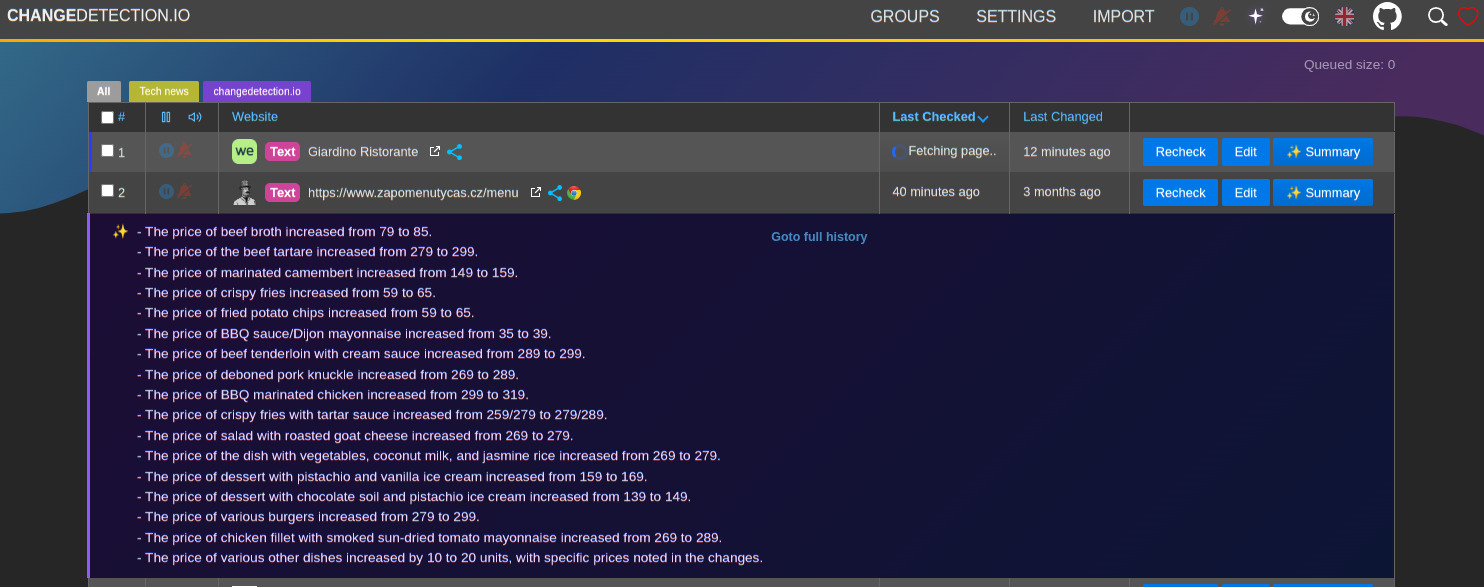
Note: Available in our subscription/hosted service from June 2026
Target specific parts of the webpage using the Visual Selector tool.
Available when connected to a playwright content fetcher (included as part of our subscription service)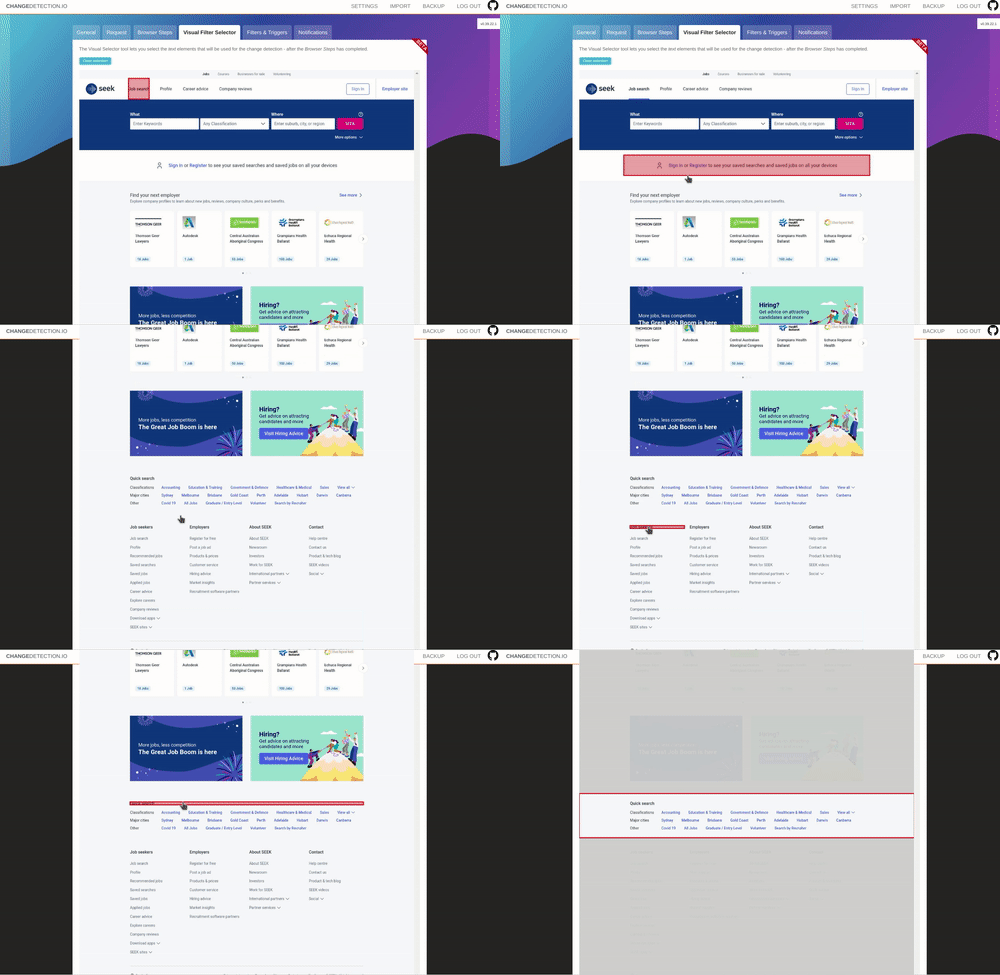
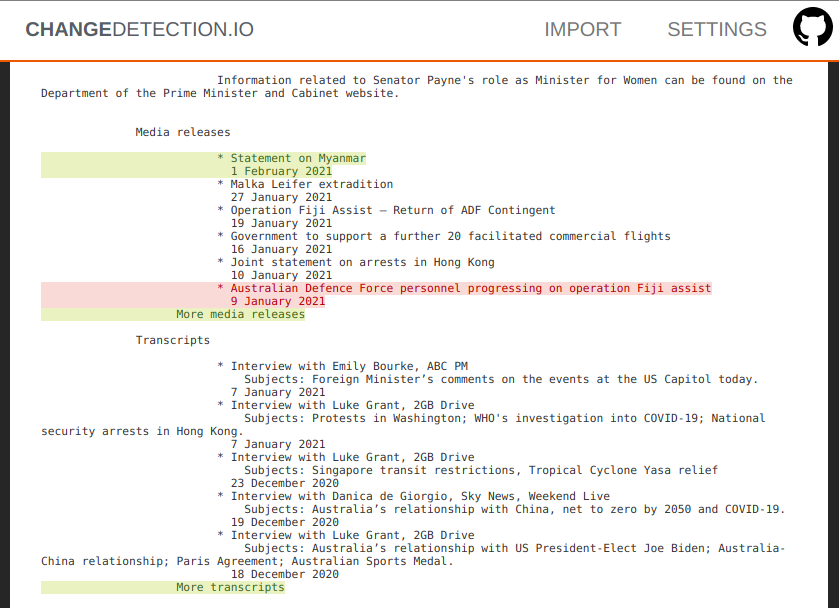
Easily see what changed, examine by word, line, or individual character.
Perform interactive browser steps
Fill in text boxes, click buttons and more, setup your changedetection scenario.Using the Browser Steps configuration, add basic steps before performing change detection, such as logging into websites, adding a product to a cart, accept cookie logins, entering dates and refining searches.
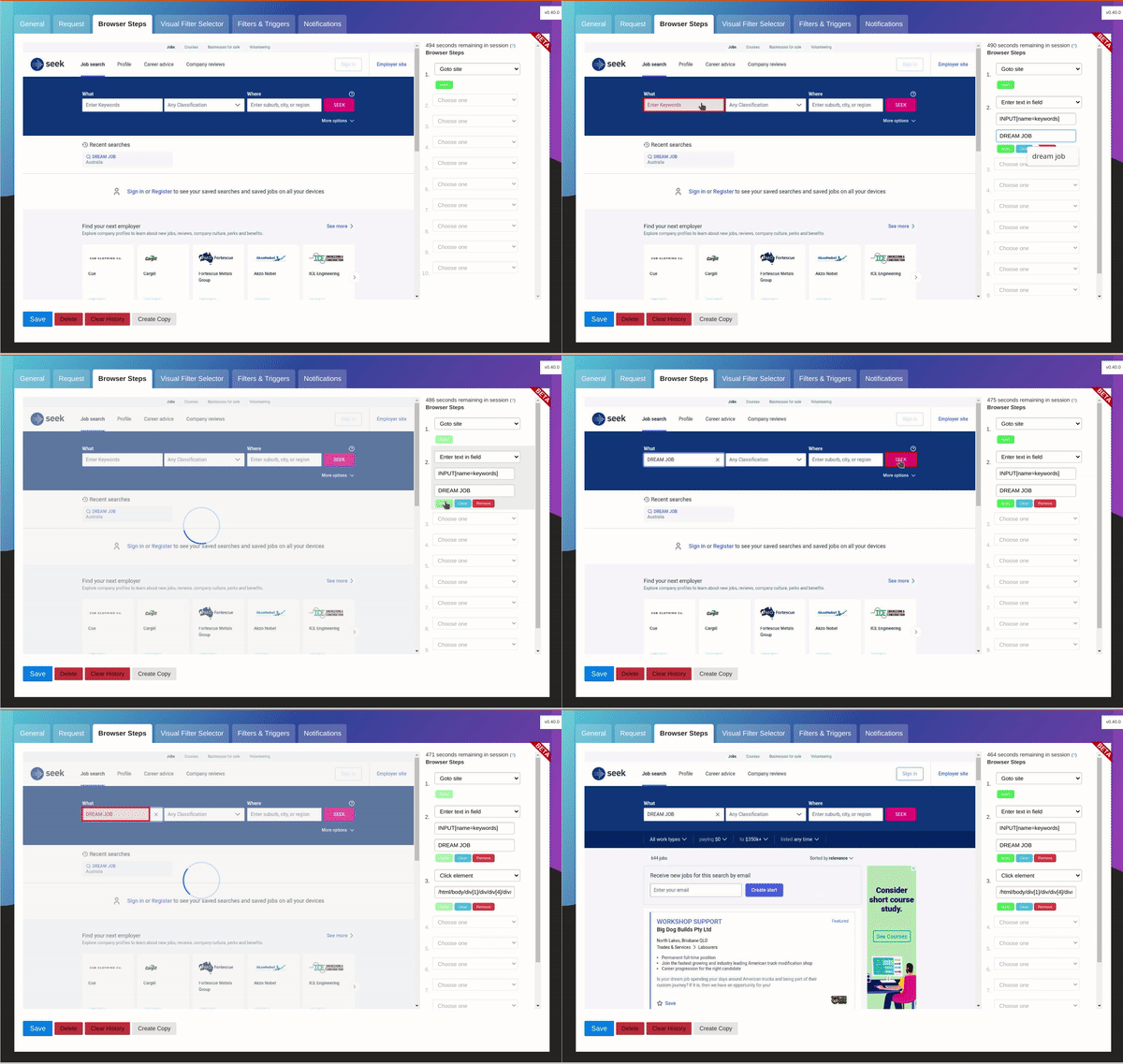
After Browser Steps have been run, then visit the Visual Selector tab to refine the content you're interested in. Requires Playwright to be enabled.
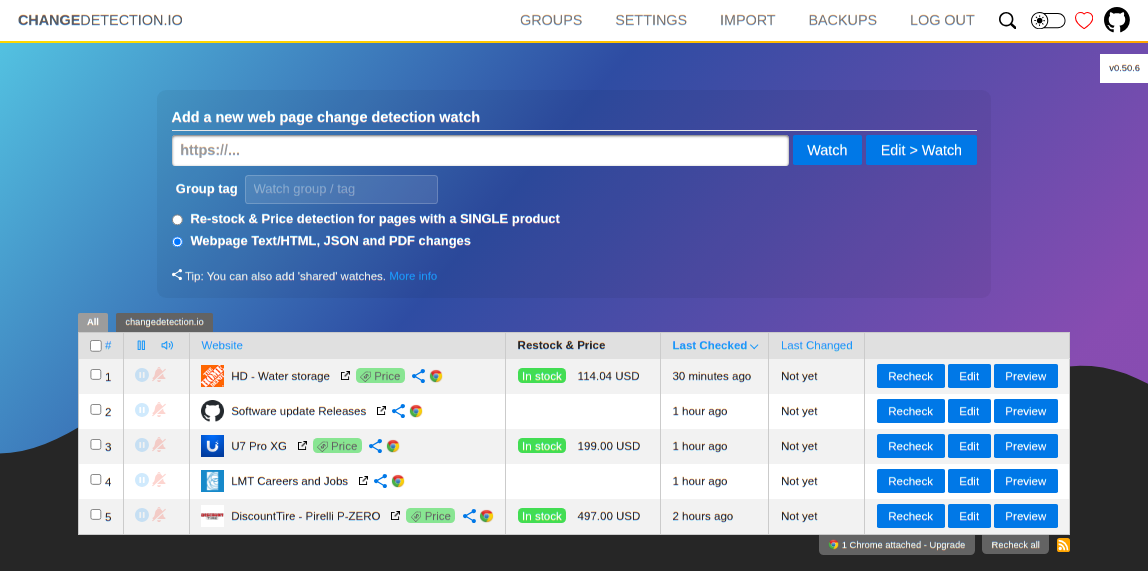
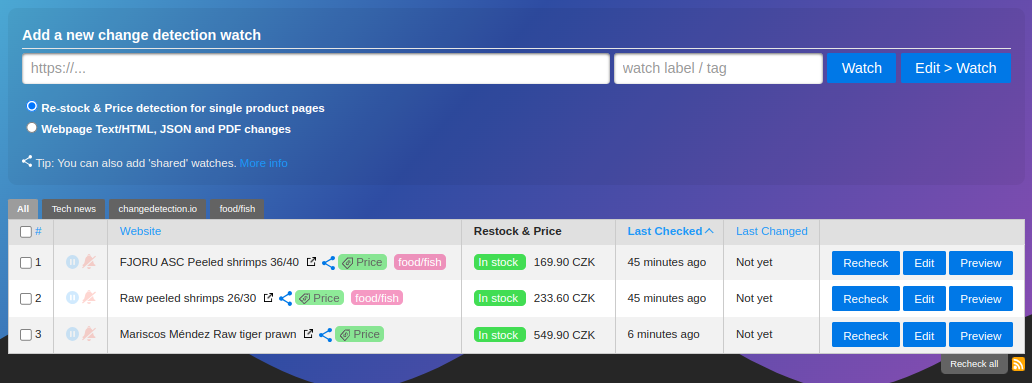
Awesome restock and price change notifications
Enable the "Re-stock & Price detection for single product pages" option to activate the best way to monitor product pricing, this will extract any meta-data in the HTML page and give you many options to follow the pricing of the product.Easily organise and monitor prices for products from the dashboard, get alerts and notifications when the price of a product changes or comes back in stock again!
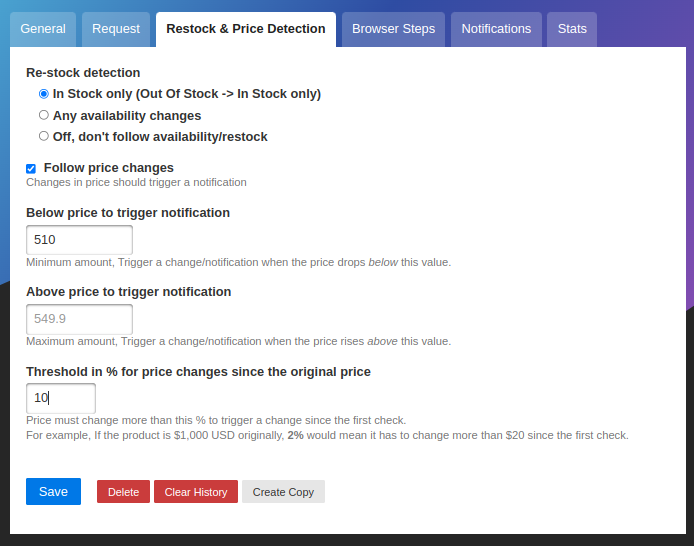
Set price change notification parameters, upper and lower price, price change percentage and more. Always know when a product for sale drops in price.
Example use cases
- Products and services have a change in pricing
- Out of stock notification and Back In stock notification
- Monitor and track PDF file changes, know when a PDF file has text changes.
- Governmental department updates (changes are often only on their websites)
- New software releases, security advisories when you're not on their mailing list.
- Festivals with changes
- Discogs restock alerts and monitoring
- Realestate listing changes
- Know when your favourite whiskey is on sale, or other special deals are announced before anyone else
- COVID related news from government websites
- University/organisation news from their website
- Detect and monitor changes in JSON API responses
- JSON API monitoring and alerting
- Changes in legal and other documents
- Trigger API calls via notifications when text appears on a website
- Glue together APIs using the JSON filter and JSON notifications
- Create RSS feeds based on changes in web content
- Monitor HTML source code for unexpected changes, strengthen your PCI compliance
- You have a very sensitive list of URLs to watch and you do not want to use the paid alternatives. (Remember, you are the product)
- Get notified when certain keywords appear in Twitter search results
- Proactively search for jobs, get notified when companies update their careers page, search job portals for keywords.
- Get alerts when new job positions are open on Bamboo HR and other job platforms
- Website defacement monitoring
- Pokémon Card Restock Tracker / Pokémon TCG Tracker
- RegTech - stay ahead of regulatory changes, regulatory compliance
Need an actual Chrome runner with Javascript support? We support fetching via WebDriver and Playwright!
Key Features
- Lots of trigger filters, such as "Trigger on text", "Remove text by selector", "Ignore text", "Extract text", also using regular-expressions!
- Target elements with xPath 1 and xPath 2, CSS Selectors, Easily monitor complex JSON with JSONPath or jq
- Switch between fast non-JS and Chrome JS based "fetchers"
- Track changes in PDF files (Monitor text changed in the PDF, Also monitor PDF filesize and checksums)
- Easily specify how often a site should be checked
- Execute JS before extracting text (Good for logging in, see examples in the UI!)
- Override Request Headers, Specify
POSTorGETand other methods - Use the "Visual Selector" to help target specific elements
- Configurable proxy per watch
- Send a screenshot with the notification when a change is detected in the web page
We recommend and use Bright Data global proxy services, Bright Data will match any first deposit up to $150 using our signup link.
Please :star: star :star: this project and help it grow! https://github.com/dgtlmoon/changedetection.io/
Conditional web page changes
Easily configure conditional actions, for example, only trigger when a price is above or below a preset amount, or when a web page includes (or does not include) a keyword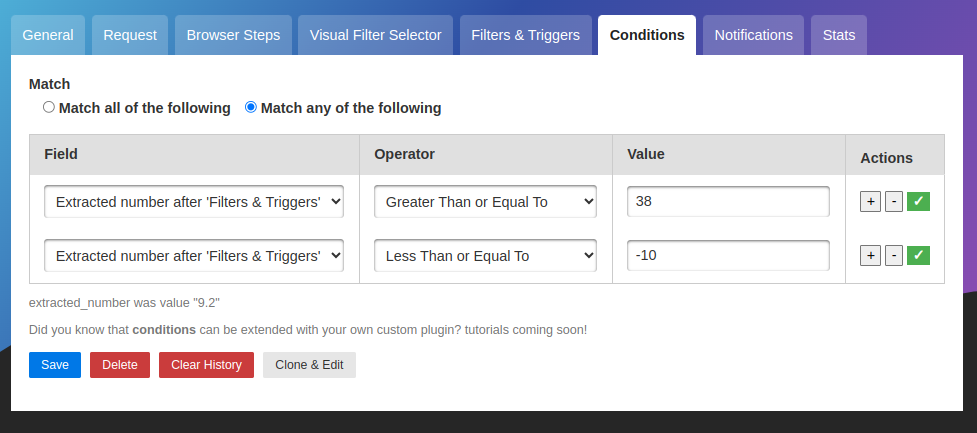
Schedule web page watches in any timezone, limit by day of week and time.
Easily set a re-check schedule, for example you could limit the web page change detection to only operate during business hours. Or perhaps based on a foreign timezone (for example, you want to check for the latest news-headlines in a foreign country at 0900 AM),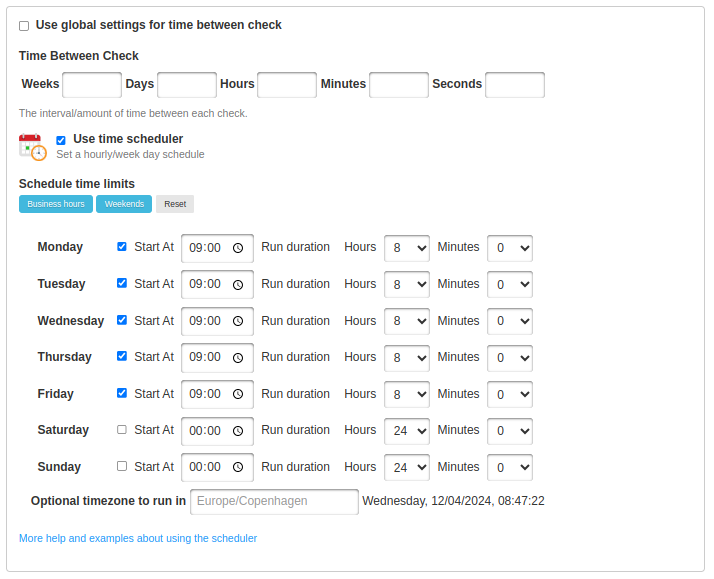
Includes quick short-cut buttons to setup a schedule for business hours only, or weekends.
We have a Chrome extension!
Easily add the current web page to your changedetection.io tool, simply install the extension and click "Sync" to connect it to your existing changedetection.io install.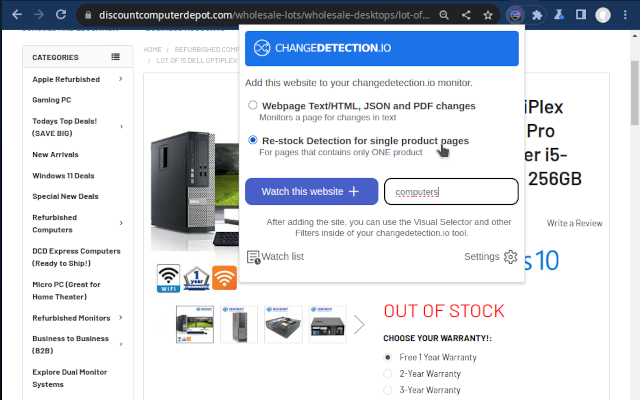
Goto the Chrome Webstore to download the extension. ( Or check out the GitHub repo )
Installation
Docker
With Docker composer, just clone this repository and..$ docker compose up -dDocker standalone
$ docker run -d --restart always -p "127.0.0.1:5000:5000" -v datastore-volume:/datastore --name changedetection.io dgtlmoon/changedetection.io:latest tag is our latest stable release, :dev tag is our bleeding edge master branch.Alternative docker repository over at ghcr - ghcr.io/dgtlmoon/changedetection.io
Windows
See the install instructions at the wiki https://github.com/dgtlmoon/changedetection.io/wiki/Microsoft-WindowsPython Pip
Check out our pypi page https://pypi.org/project/changedetection.io/$ pip3 install changedetection.io
$ changedetection.io -d /path/to/empty/data/dir -p 5000Then visit http://127.0.0.1:5000 , You should now be able to access the UI.
Now with per-site configurable support for using a fast built in HTTP fetcher or use a Chrome based fetcher for monitoring of JavaScript websites!
Updating changedetection.io
Docker
docker pull dgtlmoon/changedetection.io
docker kill $(docker ps -a -f name=changedetection.io -q)
docker rm $(docker ps -a -f name=changedetection.io -q)
docker run -d --restart always -p "127.0.0.1:5000:5000" -v datastore-volume:/datastore --name changedetection.io dgtlmoon/changedetection.io
docker compose
docker compose pull && docker compose up -dSee the wiki for more information https://github.com/dgtlmoon/changedetection.io/wiki
Different browser viewport sizes (mobile, desktop etc)
If you are using the recommendedsockpuppetbrowser (which is in the docker-compose.yml as a setting to be uncommented) you can easily set different viewport sizes for your web page change detection, see more information here about setting up different viewport sizes.Filters
XPath(1.0), JSONPath, jq, and CSS support comes baked in! You can be as specific as you need, use XPath exported from various XPath element query creation tools. (We support LXMLre:test, re:match and re:replace.)Notifications
ChangeDetection.io supports a massive amount of notifications (including email, office365, custom APIs, etc) when a web-page has a change detected thanks to the apprise library. Simply set one or more notification URL's in the edit tab of that watch.Just some examples
discord://webhook_id/webhook_token
flock://app_token/g:channel_id
gitter://token/room
gchat://workspace/key/token
msteams://TokenA/TokenB/TokenC/
o365://TenantID:AccountEmail/ClientID/ClientSecret/TargetEmail
rocket://user:password@hostname/#Channel
mailto://user:pass@example.com?to=receivingAddress@example.com
json://someserver.com/custom-api
syslog://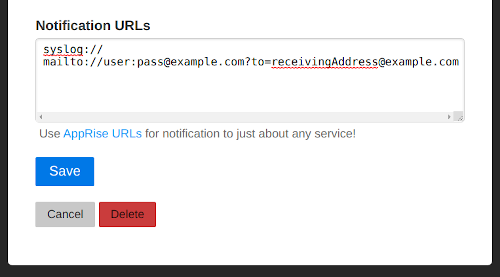
Now you can also customise your notification content and use Jinja2 templating for their title and body!
JSON API Monitoring
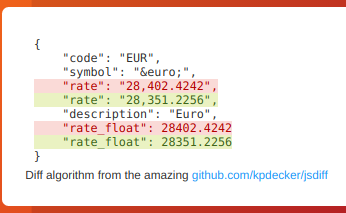
Detect changes and monitor data in JSON API's by using either JSONPath or jq to filter, parse, and restructure JSON as needed.
This will re-parse the JSON and apply formatting to the text, making it super easy to monitor and detect changes in JSON API results
JSONPath or jq?
For more complex parsing, filtering, and modifying of JSON data, jq is recommended due to the built-in operators and functions. Refer to the documentation for more specific information on jq.One big advantage of
jq is that you can use logic in your JSON filter, such as filters to only show items that have a value greater than/less than etc.See the wiki https://github.com/dgtlmoon/changedetection.io/wiki/JSON-Selector-Filter-help for more information and examples
Parse JSON embedded in HTML!
When you enable ajson: or jq: filter, you can even automatically extract and parse embedded JSON inside a HTML page! Amazingly handy for sites that build content based on JSON, such as many e-commerce websites. ``` ... ```
json:$..price or jq:..price would give 3949.99, or you can extract the whole structure (use a JSONpath test website to validate with)The application also supports notifying you that it can follow this information automatically
Proxy Configuration
See the wiki https://github.com/dgtlmoon/changedetection.io/wiki/Proxy-configuration , we also support using Bright Data proxy services where possible and Oxylabs proxy services.Raspberry Pi support?
Raspberry Pi and linux/arm/v6 linux/arm/v7 arm64 devices are supported! See the wiki for detailsImport support
Easily import your list of websites to watch for changes in Excel .xslx file format, or paste in lists of website URLs as plaintext.Excel import is recommended - that way you can better organise tags/groups of websites and other features.
API Support
Full REST API for programmatic management of watches, tags, notifications and more.- Interactive API Documentation - Complete API reference with live testing
- OpenAPI Specification - Generate SDKs for any programming language
Support us
Do you use changedetection.io to make money? does it save you time or money? Does it make your life easier? less stressful? Remember, we write this software when we should be doing actual paid work, we have to buy food and pay rent just like you.Consider taking out an officially supported website change detection subscription , even if you don't use it, you still get the warm fuzzy feeling of helping out the project. (And who knows, you might just use it!)
Commercial Support
I offer commercial support, this software is depended on by network security, aerospace , data-science and data-journalist professionals just to name a few, please reach out at dgtlmoon@gmail.com for any enquiries, I am more than glad to work with your organisation to further the possibilities of what can be done with changedetection.ioDisclaimer
This software is provided "as-is", without warranty of any kind, express or implied, including but not limited to the warranties of merchantability, fitness for a particular purpose, and non-infringement. In no event shall the authors or copyright holders be liable for any claim, damages, or other liability, whether in an action of contract, tort, or otherwise, arising from, out of, or in connection with the software or the use or other dealings in the software.Website content monitoring
You are solely responsible for ensuring that your use of this software complies with the terms of service,robots.txt directives, access policies, and all applicable laws of any website or service you choose to monitor. The authors and contributors of this software accept no liability whatsoever for how you choose to use it or for any consequences arising from that use.AI / LLM features
If you choose to enable AI / LLM features, content detected on monitored websites — including page diffs and extracted text — will be transmitted to a third-party AI provider of your choosing, outside of this installation. You are solely responsible for:- Ensuring such transmission is permitted by the terms of service of every website you monitor.
- Compliance with all applicable data-protection and privacy laws (including but not limited to GDPR) with respect to any personal data that may appear in monitored content.
- All API costs and charges levied by your chosen AI provider. This software has no visibility into or control over those charges.
- Any consequences arising from acting on AI-generated output.
AI and LLM models are known to hallucinate — producing plausible-sounding but factually incorrect, incomplete, or entirely fabricated output with apparent confidence. By design, LLMs may also omit or silently truncate relevant information during summarisation. AI output must never be relied upon as complete or accurate.
By using this software, and in particular any AI / LLM features, you personally indemnify and hold harmless the author(s), contributor(s), and any associated parties from and against any and all claims, damages, losses, costs, and expenses (including reasonable legal fees) arising out of or in connection with your use of this software.
Third-party licenses
changedetectionio.htmltools.elementpathtostring: Copyright (c), 2018-2021, SISSA (Scuola Internazionale Superiore di Studi Avanzati), Licensed under MIT licenseContributors
Recognition of fantastic contributors to the projectDeveloper note: see translation guide for i18n template patterns and workflow.
- Constantin Hong https://github.com/Constantin1489
Serve ChangeDetection on your own domain behind Caddy, Nginx or Traefik. Fill in your domain and copy the result. It's a starting point, some apps need their own base URL or extra headers set too.
Proxying changedetection.example.com to http://changedetection:5000
Add this to your Caddyfile
changedetection.example.com {
	reverse_proxy http://changedetection:5000
}Check the logs first
Nine times out of ten the logs tell you exactly what went wrong.
- In Portainer, go to Containers, click the container, then Logs. Or run
docker logs changedetection - Exit codes help too:
137means killed, usually out of memory.126or127means the command inside the image is broken.
Published on a random port
This template exposes 5000/tcp without setting a host port,
so Docker picks a random free one on every deploy.
- Find it in the Ports column of Portainer's container list, or with
docker port changedetection
Permission denied on volumes
If the logs show "permission denied", the app can't write to its data folder on the host.
- Fix the ownership:
sudo chown -R 1000:1000 /opt/mediadepot/apps/changedetection
Image won't pull
Test the pull directly on the host: docker pull ghcr.io/dgtlmoon/changedetection.io:latest
- "manifest unknown" means the tag no longer exists. This template uses
latest, so try pinning a specific version instead. - "toomanyrequests" is the Docker Hub rate limit. Log in with
docker loginto raise it. - "no space left on device" means a full disk. Reclaim space with
docker system prune
"exec format error"
This means the image was built for a different CPU architecture than your server.
- This image supports:
amd64, arm64, arm/v7, arm/v8 - Check yours with
uname -m: x86_64 is amd64, aarch64 is arm64. Raspberry Pi and other ARM boards are the usual culprits.
Raise an issue
Found something which isn't working as it should? Here's how to report it.
- Bug within the app: Open an issue on dgtlmoon/changedetection.io
- Template not working: Open an issue on mediadepot/templates
- This website not working: Open an issue on lissy93/portainer-templates
A single container
ChangeDetection runs as one container, the simplest kind of app here. Just the one image to pull and nothing else wired up alongside it.
The app image
An image is the app packed up ready to go, everything ChangeDetection needs bundled into one download. This template pulls ghcr.io/dgtlmoon/changedetection.io:latest, which Docker fetches once (about 342 MB) and then starts your own copy from.
Where the image comes from
Docker pulls its images from registries, public libraries of ready-built apps. ChangeDetection's comes from the GitHub Container Registry, published by dgtlmoon.
Version tags
The bit after the colon in the image name is the version tag. Here it's latest, which always points at the newest build, so a redeploy can bump you to a newer release without you asking. Pin a specific tag if you would rather stay on one version.
Which machines it runs on
Every image is built for particular CPU types. This one ships for amd64, arm64, arm/v7, arm/v8, so it runs on both regular x86 servers and ARM boards like a Raspberry Pi.
Ports
A port is the door the app answers on. Here the app exposes a port but leaves the host side blank, so Docker picks a free one for you. It opens:
5000, published on a random host port
Volumes
A volume is where ChangeDetection keeps its files so they survive an update or a restart. Without one, anything it saves would sit inside the container and vanish the moment it's recreated. This template mounts:
/datastorefrom/opt/mediadepot/apps/changedetectionon the host
Networking
Nothing custom is set, so ChangeDetection sits on Docker's default bridge network: its own private space that reaches the outside world only through the ports it publishes.
Container name
Once it's deployed, Portainer names the container changedetection. That's what you'll spot in the containers list and use in commands like docker logs changedetection.
Labels
Labels are small notes pinned to the container. They don't change how ChangeDetection behaves, but other tools read them, most often a reverse proxy like Traefik working out which apps to route where. This template sets:
traefik.enable=truetraefik.http.services.changedetection.loadbalancer.server.port=5000traefik.http.routers.changedetection.entrypoints=websecuretraefik.http.routers.changedetection.tls.certresolver=mydnschallenge
Open source license
ChangeDetection is open source, released under the Apache-2.0 license. In plain terms the code is out in the open, so you're free to run it and change it to fit what you need.
Portainer app templates
Zooming out, this whole page comes from a Portainer app template: a short recipe telling Portainer how to set ChangeDetection up. Add the template list to Portainer once, then deploying ChangeDetection is a click rather than a wall of config.