
![Maloja]() Maloja
Maloja
Container
Simple self-hosted music scrobble database to create personal listening statistics. No recommendations, no social network, no nonsense.
Image details
Source details
Configuration
TypeContainerlinuxkrateng/maloja:latest42010:42010/tcp/data : /portainer/Files/AppData/Config/Maloja/DataMALOJA_FORCE_PASSWORD=malojapasswordMALOJA_DATA_DIRECTORY=/dataunless-stoppedTemplate by novaspirit
Report issueNotes
Check our Github page: https://github.com/pi-hosted/pi-hosted
Official Webpage: https://github.com/krateng/maloja
Official Docker Documentation: https://github.com/krateng/maloja/blob/master/README.md
Pre-installation script must be RAN before you install: wget -qO- https://raw.githubusercontent.com/pi-hosted/pi-hosted/master/tools/install_maloja.sh | bash
Standalone Install
Select an install method, to see config/commands for deploying Maloja
Install on Portainer
Import all app templates into your Portainer instance, for easy 1-click deploys
- Ensure both Docker and Portainer are installed, and up-to-date
- Log into your Portainer web UI
- Under Settings → App Templates, paste the below URL
- Head to Home → App Templates, and the list of apps will show up
- Select Maloja, fill in any config options, and hit Deploy
Template Import URL
https://raw.githubusercontent.com/Lissy93/portainer-templates/main/templates.json
Show Me

More install options in our documentation, or see krateng/maloja for app-specific guidance.
Maloja



Simple self-hosted music scrobble database to create personal listening statistics.
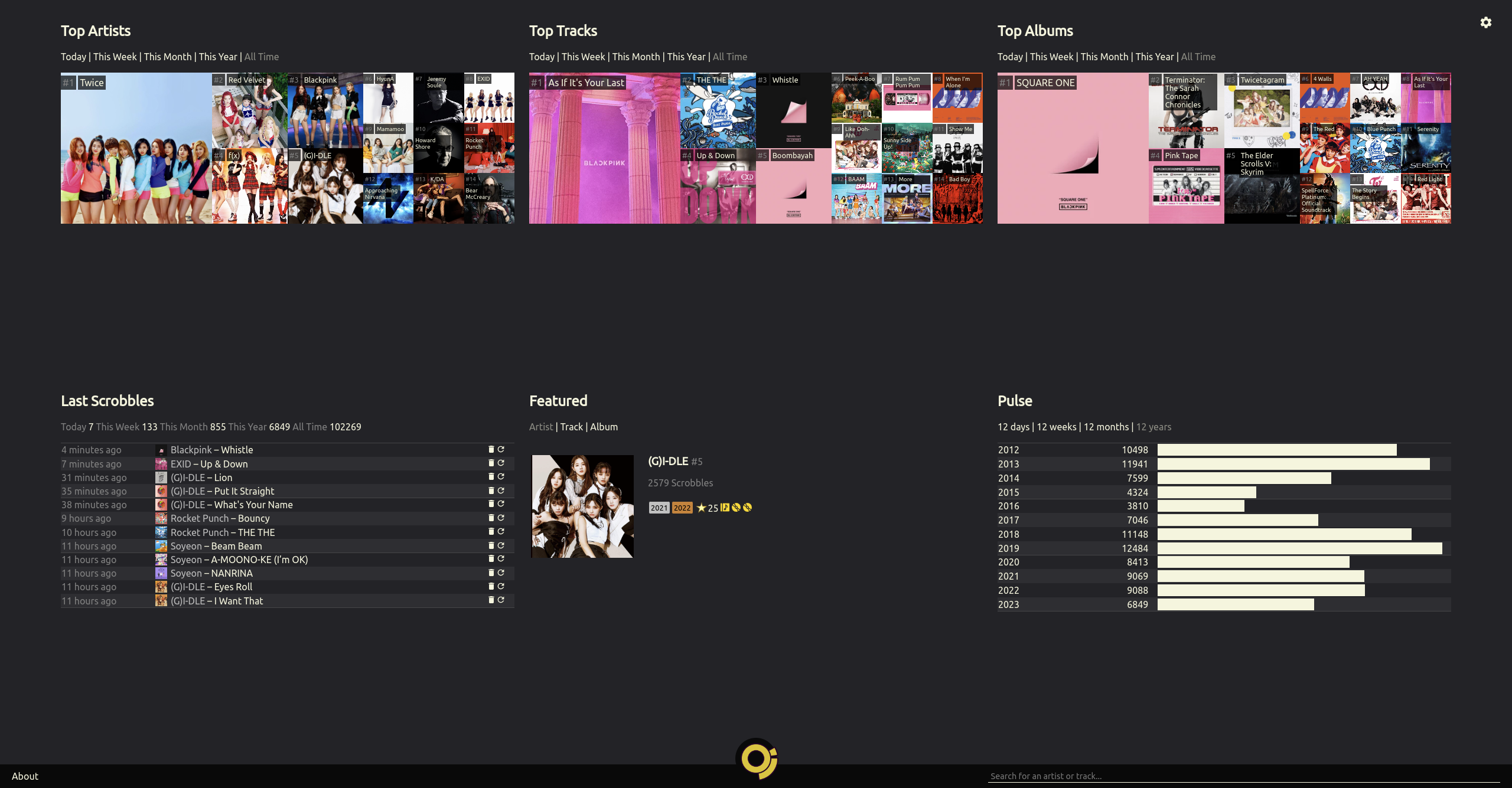
You can check my own Maloja page as an example instance.
Table of Contents
* [Extras](#extras)* [Basic control](#basic-control)
* [Data](#data)
* [Customization](#customization)Features
- Self-hosted: You will always be able to access your data in an easily-parseable format. Your library is not synced with any public or official music database, so you can follow your own tagging schema.
- Associated Artists: Compare different artists' popularity in your listening habits including subunits, collaboration projects or solo performances by their members. Change these associations at any time without losing any information.
- Multi-Artist Tracks: Some artists often collaborate with others or are listed under "featuring" in the track title. Instead of tracking each combination of artists, each individual artist competes in your charts.
- Custom Images: Don't rely on the community to select the best pictures for your favorite artists. Upload your own so that your start page looks like you want it to look.
- Proxy Scrobble: No need to fully commit or set up every client twice - you can configure your Maloja server to forward your scrobbles to other services.
- Standard-compliant API: Use existing, mature apps or extensions to scrobble to your Maloja server.
- Manual Scrobbling: Listening to vinyl or elevator background music? Simply submit a scrobble with the web interface.
- Keep it Simple: Unlike Last.fm and similar alternatives, Maloja doesn't have social networking, radios, recommendations or any other gimmicks. It's a tool to keep track of your listening habits over time - and nothing more.
How to install
To avoid issues with version / dependency mismatches, Maloja should only be used in Docker or Podman, not on bare metal. I cannot offer any help for bare metal installations (but using venv should help).Pull the latest image or check out the repository and use the included Containerfile.
Of note are these settings which should be passed as environmental variables to the container:
MALOJA_SKIP_SETUP-- Make the server setup process non-interactive. Maloja will not work properly in a container without this variable set. This is done by default in the provided Containerfile.MALOJA_FORCE_PASSWORD-- Set an admin password for Maloja. You only need this on the first run.MALOJA_DATA_DIRECTORY-- Set the directory in the container where configuration folders/files should be located
* Mount a [volume](https://docs.docker.com/engine/reference/builder/#volume) to the specified directory to access these files outside the container (and to make them persistent)An example of a minimum run configuration to access maloja via
localhost:42010:docker run -p 42010:42010 -v $PWD/malojadata:/mljdata -e MALOJA_DATA_DIRECTORY=/mljdata krateng/malojaIf you are using rootless containers with Podman the following DOES NOT apply to you, but if you are running Docker on a Linux Host you should specify
user:group ids of the user who owns the folder on the host machine bound to MALOJA_DATA_DIRECTORY in order to avoid docker file permission problems. These can be specified using the environmental variables PUID and PGID.To get the UID and GID for the current user run these commands from a terminal:
id -u-- prints UID (EX1000)id -g-- prints GID (EX1001)
The modified run command with these variables would look like:
docker run -e PUID=1000 -e PGID=1001 -p 42010:42010 -v $PWD/malojadata:/mljdata -e MALOJA_DATA_DIRECTORY=/mljdata krateng/malojaExtras
- If you'd like to display images, you will need API keys for Last.fm and Spotify. These are free of charge!
- Put your server behind a reverse proxy for SSL encryption. Make sure that you're proxying to the IPv6 or IPv4 address according to your settings.
How to use
Basic control
When not running in a container, you can run the application withmaloja run.Data
If you would like to import your previous scrobbles, copy them into the import folder in your data directory. This works on:- a Last.fm export generated by ghan64's website
- an official Spotify data export file
- an official ListenBrainz export file
- the export of another Maloja instance
Customization
- Have a look at the available settings and specifiy your choices in
/etc/maloja/settings.ini. You can also set each of these settings as an environment variable with the prefixMALOJA_(e.g.MALOJA_SKIP_SETUP).
- If you have activated admin mode in your web interface, you can upload custom images for artists or tracks by simply dragging them onto the existing image on the artist or track page. You can also manage custom images directly in the file system - consult
images.infoin the/var/lib/maloja/imagesfolder.
- To specify custom rules, consult the
rules.infofile in/etc/maloja/rules. You can also apply some predefined rules on the/admin_setuppage of your server.
How to scrobble
You can set up any amount of API keys in the fileapikeys.yml in your configuration folder (or via the web interface). It is recommended to define a different API key for every scrobbler you use.Some scrobbler clients support Maloja's native API. You can also use any scrobbler that allows you to set a custom Listenbrainz or GNUFM server. See API.md for details.
If you're the maintainer of a music player or server and would like to implement native Maloja scrobbling, feel free to reach out!
If you can't automatically scrobble your music, you can always do it manually on the
/admin_manual page of your Maloja server.How to extend
If you'd like to implement anything on top of Maloja, visit/api_explorer.Serve Maloja on your own domain behind Caddy, Nginx or Traefik. Fill in your domain and copy the result. It's a starting point, some apps need their own base URL or extra headers set too.
Proxying maloja.example.com to http://maloja:42010
Add this to your Caddyfile
maloja.example.com {
	reverse_proxy http://maloja:42010
}Check the logs first
Nine times out of ten the logs tell you exactly what went wrong.
- In Portainer, go to Containers, click the container, then Logs. Or run
docker logs maloja - Exit codes help too:
137means killed, usually out of memory.126or127means the command inside the image is broken.
Port already in use
If deployment fails with "Bind for 0.0.0.0:42010 failed: port is already allocated", something else on your server is using that port.
- Find what's using it:
sudo ss -tlnp | grep :42010 - Stop the other service, or pick a different host port. In
42010:42010only the left number is yours to change, the right one belongs to the app.
Running but the page won't load
The container is up but nothing appears in your browser.
- Use your server's real IP:
http://your-server-ip:42010. The 0.0.0.0 link Portainer shows isn't a real address. - Give it a minute after first deploy, maloja can take a while to initialise.
- Make sure your firewall allows the port, e.g.
sudo ufw allow 42010
Permission denied on volumes
If the logs show "permission denied", the app can't write to its data folder on the host.
- Fix the ownership:
sudo chown -R 1000:1000 /portainer/Files/AppData/Config/Maloja/Data
Image won't pull
Test the pull directly on the host: docker pull krateng/maloja:latest
- "manifest unknown" means the tag no longer exists. This template uses
latest, so try pinning a specific version instead. - "toomanyrequests" is the Docker Hub rate limit. Log in with
docker loginto raise it. - "no space left on device" means a full disk. Reclaim space with
docker system prune
"exec format error"
This means the image was built for a different CPU architecture than your server.
- This image supports:
amd64, arm64, arm/v7 - Check yours with
uname -m: x86_64 is amd64, aarch64 is arm64. Raspberry Pi and other ARM boards are the usual culprits.
Container keeps restarting
The unless-stopped restart policy relaunches the app after every crash, so the real error can scroll past.
- Check the logs right after a restart, the last few lines before it died are the useful ones.
- Get the exit code with
docker inspect maloja --format '{{.State.ExitCode}}' - Still stuck? Redeploy once with the restart policy set to
noso the failure stays visible.
Raise an issue
Found something which isn't working as it should? Here's how to report it.
- Bug within the app: Open an issue on krateng/maloja
- Template not working: Open an issue on novaspirit/pi-hosted
- This website not working: Open an issue on lissy93/portainer-templates
A single container
Maloja runs as one container, the simplest kind of app here. Just the one image to pull and nothing else wired up alongside it.
The app image
An image is the app packed up ready to go, everything Maloja needs bundled into one download. This template pulls krateng/maloja:latest, which Docker fetches once (about 46 MB) and then starts your own copy from.
Where the image comes from
Docker pulls its images from registries, public libraries of ready-built apps. Maloja's comes from Docker Hub, published by krateng.
Version tags
The bit after the colon in the image name is the version tag. Here it's latest, which always points at the newest build, so a redeploy can bump you to a newer release without you asking. Newest right now is 3.2.6. Pin a specific tag if you would rather stay on one version.
Which machines it runs on
Every image is built for particular CPU types. This one ships for amd64, arm64, arm/v7, so it runs on both regular x86 servers and ARM boards like a Raspberry Pi.
Ports
A port is the door the app answers on. A mapping like 42010:42010 means it's reachable on port 42010 of your server, where the left number is yours to change and the right one belongs to the app. It opens:
42010:42010
Volumes
A volume is where Maloja keeps its files so they survive an update or a restart. Without one, anything it saves would sit inside the container and vanish the moment it's recreated. This template mounts:
/datafrom/portainer/Files/AppData/Config/Maloja/Dataon the host
Environment variables
Environment variables are the settings you hand over when you deploy, things like a password or a timezone. Maloja takes 2 of them, all with defaults you can leave alone or tweak:
MALOJA_FORCE_PASSWORD, defaults tomalojapasswordMALOJA_DATA_DIRECTORY, defaults to/data
Restart policy
The restart policy here is unless-stopped, so Docker restarts Maloja after a crash or reboot, but leaves it off when you stop it on purpose. You can change this on the deploy screen. The choices are no (never restart), on-failure (only after a crash), unless-stopped (restart unless you stop it), and always (bring it back no matter what).
Networking
Nothing custom is set, so Maloja sits on Docker's default bridge network: its own private space that reaches the outside world only through the ports it publishes.
Container name
Once it's deployed, Portainer names the container maloja. That's what you'll spot in the containers list and use in commands like docker logs maloja.
Platform
The platform is linux, the kind of system the container is built to run on. Docker and Portainer handle this on a normal Linux server.
Open source license
Maloja is open source, released under the GPL-3.0 license. In plain terms the code is out in the open, so you're free to run it and change it to fit what you need.
Portainer app templates
Zooming out, this whole page comes from a Portainer app template: a short recipe telling Portainer how to set Maloja up. Add the template list to Portainer once, then deploying Maloja is a click rather than a wall of config.