
![SolidPing]() SolidPing
Container
Uptime and synthetic monitoring with status pages, incidents and alerts. Checks HTTP, DNS, TCP, ICMP, TLS expiry, databases, message brokers, heartbeats and headless browser scenarios. Source: https://github.com/fclairamb/solidping
Image details
Source details
Configuration
TypeContainerlinuxghcr.io/fclairamb/solidping:latest4000:4000/tcp/dataSP_NODE_NAME=solidpingSP_BASE_URL=http://localhost:4000unless-stoppedNotes
http://<your-host>:4000. First login: admin@solidping.io / solidpass, organization default. You are asked to set a new password right away. The SQLite database and uploads live in the /data volume. No secret is needed to start. Configuration: docs.solidping.ioStandalone Install
Select an install method, to see config/commands for deploying SolidPing
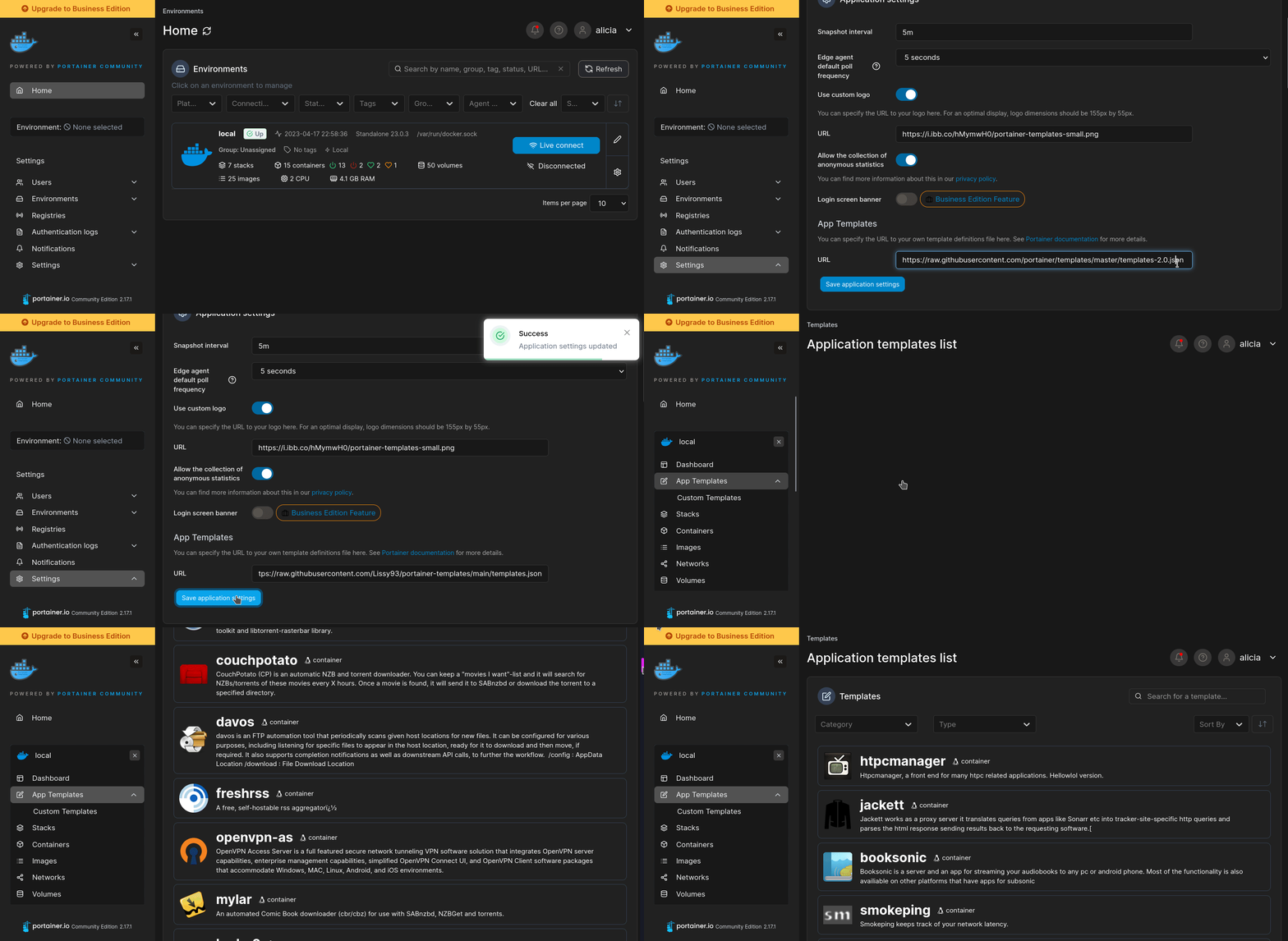
Install on Portainer
Import all app templates into your Portainer instance, for easy 1-click deploys
- Ensure both Docker and Portainer are installed, and up-to-date
- Log into your Portainer web UI
- Under Settings → App Templates, paste the below URL
- Head to Home → App Templates, and the list of apps will show up
- Select SolidPing, fill in any config options, and hit Deploy
Template Import URL
https://raw.githubusercontent.com/Lissy93/portainer-templates/main/templates.json
Show Me
More install options in our documentation, or see fclairamb/solidping for app-specific guidance.

SolidPing
Distributed, self-hostable uptime monitoring. 44 check types, multi-region workers, private agents, status pages, incidents and on-call escalation, in a single Go binary.https://github.com/user-attachments/assets/fe207622-7957-4e85-8a3c-d33281799f4b
From
docker run to the first result in 41 seconds, recorded from a real server with make showcase. The Tour page has the same cut if the player does not load.









Run it
docker run -p 4000:4000 --name solidping --hostname solidping -v solidping-data:/data ghcr.io/fclairamb/solidpingOpen http://localhost:4000 and sign in as
admin@solidping.io with the password printed once at the first start:docker logs solidping 2>&1 | grep "First login"Set
SP_ADMIN_PASSWORD before the first start to choose it, or to recover a lost one while it has not been changed yet. You must pick a new password on first login: the account can do nothing else until then.--hostnameis required: the worker name comes from it and must match^[a-z][a-z0-9-]{2,20}$(or setSP_NODE_NAME).- Data (SQLite database and uploads) lives in
/data, so keep the volume. - For production, use PostgreSQL: add
-e SP_DB_TYPE=postgres -e SP_DB_URL='postgresql://user:pass@host:5432/solidping'. Migrations run on first boot.
Every other setting is an
SP_ environment variable, all optional: see the configuration docs.Other ways to run it:
| Hosted | www.solidping.io, no card needed |
| Docker Compose | guide |
| Binary (Linux, macOS, Windows) | releases, Linux guide, macOS guide, Windows guide |
| Homebrew | brew install fclairamb/tap/solidping |
| winget | winget install fclairamb.SolidPing |
| Scoop | scoop bucket add fclairamb https://github.com/fclairamb/scoop-bucket then scoop install solidping |
| Kubernetes | Helm chart, guide |
| Railway, Fly.io, Coolify, CasaOS, YunoHost | installation guides |
Screenshots
| Checks list | New-check form | Check detail |
|---|---|---|
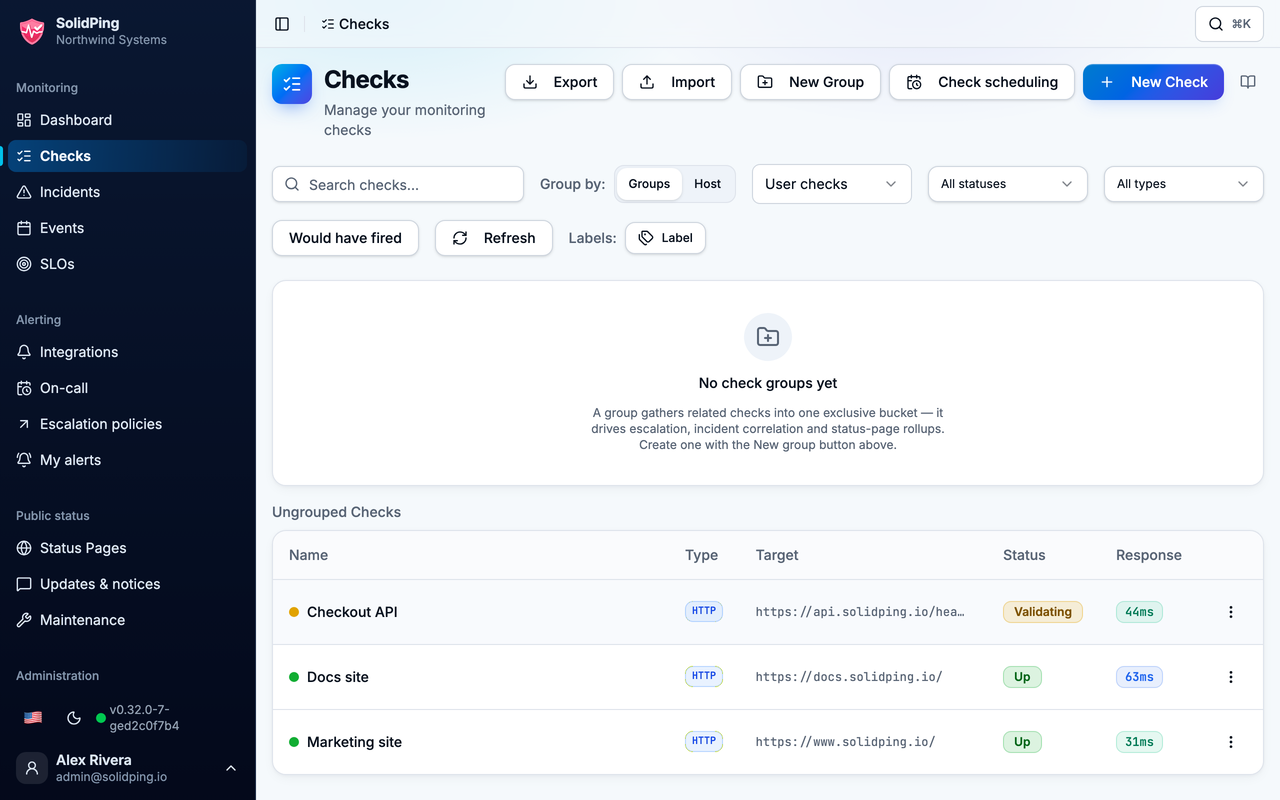 | 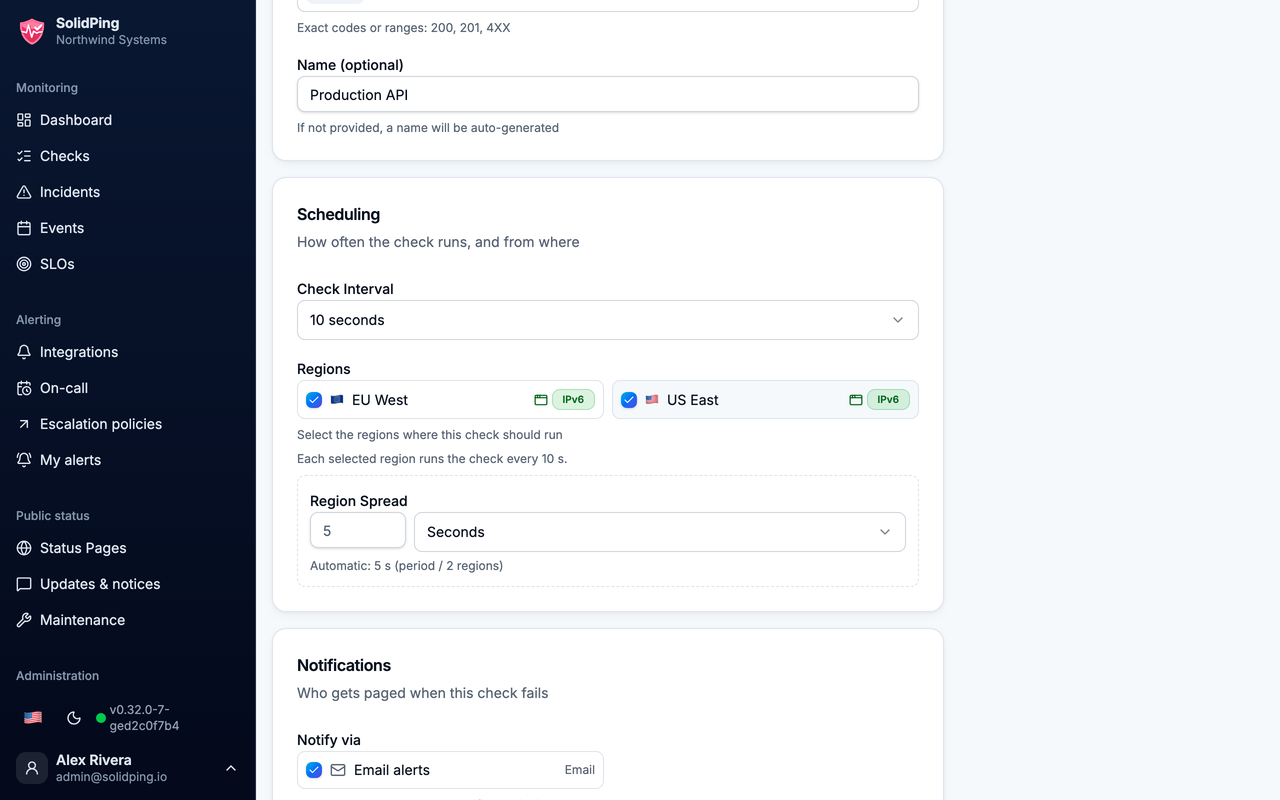 | 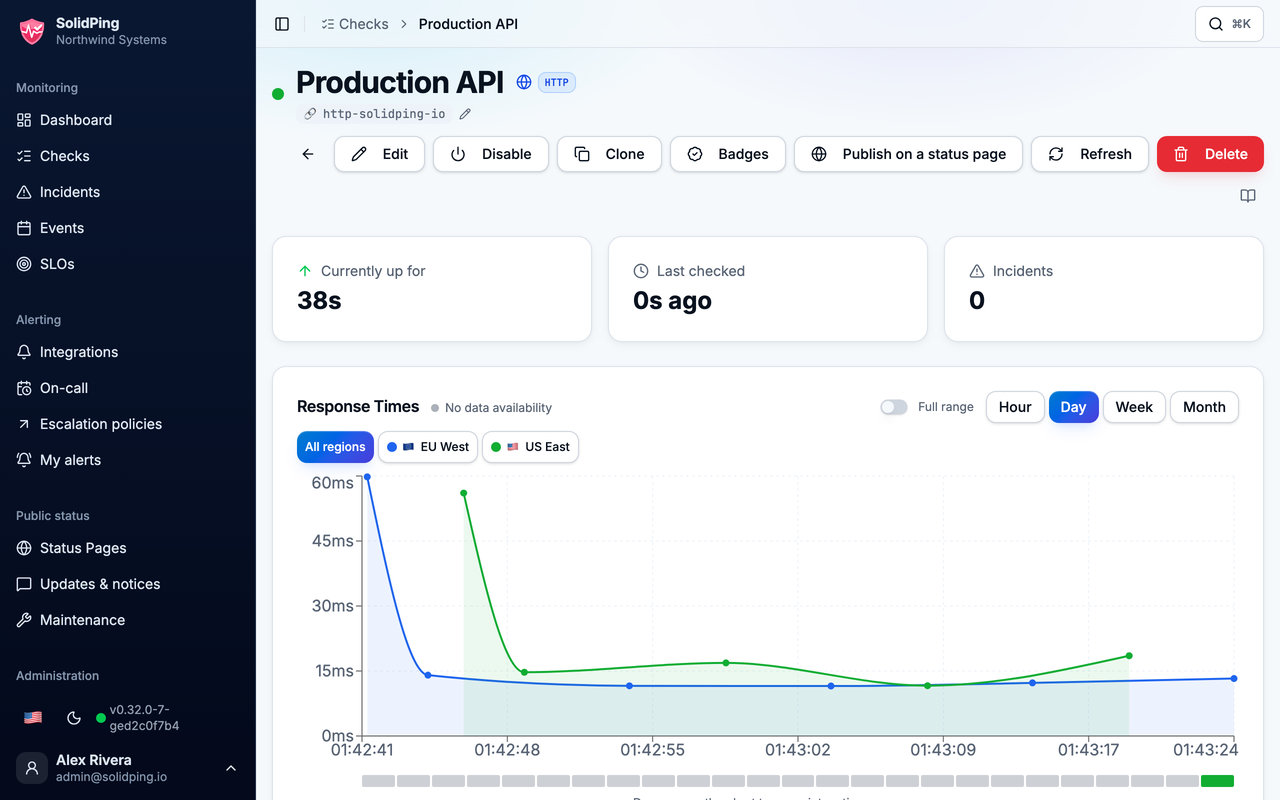 |
Check types
| Check | Type | What it checks |
|---|---|---|
| HTTP/HTTPS | http | Status codes, body, JSON and header assertions, timing breakdown |
| TCP | tcp | Port connectivity, optional send/expect payload |
| UDP | udp | Port reachability, optional send/expect payload |
| ICMP | icmp | Ping |
| DNS | dns | Record resolution |
| WebSocket | websocket | Connection handshake |
| RDP | rdp | RDP negotiation, optional authenticated logon |
| VNC | vnc | RFB handshake and authentication |
| Website crawl | crawl | Broken links, mixed content, sitemap errors |
| Application health | health | Health endpoint, reported per component |
| Vendor status page | vendor-status | Outages reported by a vendor's status page |
| SSL/TLS | ssl | Certificate validity and expiration |
| Domain | domain | Domain expiration (WHOIS/RDAP) |
| DNSBL | dnsbl | DNS blocklist membership |
| PostgreSQL | postgresql | Connection and query |
| MySQL/MariaDB | mysql | Connection and query |
| MongoDB | mongodb | Ping command |
| Redis | redis | PING command |
| MSSQL | mssql | Connection and query |
| Oracle | oracle | Connection and query |
| ClickHouse | clickhouse | Connection and query |
| SMTP | smtp | Connectivity, STARTTLS, AUTH, optional real probe email |
| IMAP | imap | Server availability |
| POP3 | pop3 | Server availability |
| Email reception | email | A known message reaches an inbox (JMAP) |
| SSH | ssh | Server availability |
| FTP | ftp | Server availability |
| SFTP | sftp | Server availability |
| gRPC | grpc | Service health |
| Kafka | kafka | Broker connectivity |
| RabbitMQ | rabbitmq | Broker connectivity |
| MQTT | mqtt | Broker connectivity |
| SIP | sip | VoIP server OPTIONS ping |
| NTP | ntp | Reachability and clock drift |
| SNMP | snmp | Device monitoring |
| Docker | docker | Container health |
| Kubernetes | kubernetes | Workload replica health |
| A2S | a2s | Source / Steam game server query |
| Minecraft | minecraft | Java and Bedrock server query |
| Freebox line | freeboxline | xDSL/FTTH line quality |
| Prometheus | prometheus | Thresholds on a scraped metric |
| Heartbeat | heartbeat | Passive: alerts when pings stop (cron jobs, CI) |
| JavaScript | js | Sandboxed scripts: multi-step API flows, logins, aggregation |
| Browser | browser | Headless Chrome: full render, screenshots |
Inspiration
- Uptime Kuma: a self-hosted monitor that is easy to run (migration guide).
- Better Stack: incidents, on-call escalation and status pages in one product (migration guide).
- Gatus: checks defined as configuration (migration guide).
- UptimeRobot: fast onboarding, one URL and you are monitoring (migration guide).
- Healthchecks.io: heartbeat monitoring for cron jobs.
- Checkly: scripted API and browser checks.
Contributing
Bug reports and pull requests are welcome.CONTRIBUTING.md covers local setup (make dev)
and PR conventions. Found a security issue? See SECURITY.md rather than opening a public issue.License
AGPL-3.0 - See LICENSE.Serve SolidPing on your own domain behind Caddy, Nginx or Traefik. Fill in your domain and copy the result. It's a starting point, some apps need their own base URL or extra headers set too.
Proxying solidping.example.com to http://solidping:4000
Add this to your Caddyfile
solidping.example.com {
	reverse_proxy http://solidping:4000
}Check the logs first
Nine times out of ten the logs tell you exactly what went wrong.
- In Portainer, go to Containers, click the container, then Logs. Or run
docker logs solidping - Exit codes help too:
137means killed, usually out of memory.126or127means the command inside the image is broken.
Port already in use
If deployment fails with "Bind for 0.0.0.0:4000 failed: port is already allocated", something else on your server is using that port.
- Find what's using it:
sudo ss -tlnp | grep :4000 - Stop the other service, or pick a different host port. In
4000:4000only the left number is yours to change, the right one belongs to the app.
Running but the page won't load
The container is up but nothing appears in your browser.
- Use your server's real IP:
http://your-server-ip:4000. The 0.0.0.0 link Portainer shows isn't a real address. - Give it a minute after first deploy, solidping can take a while to initialise.
- Make sure your firewall allows the port, e.g.
sudo ufw allow 4000
Image won't pull
Test the pull directly on the host: docker pull ghcr.io/fclairamb/solidping:latest
- "manifest unknown" means the tag no longer exists. This template uses
latest, so try pinning a specific version instead. - "toomanyrequests" is the Docker Hub rate limit. Log in with
docker loginto raise it. - "no space left on device" means a full disk. Reclaim space with
docker system prune
"exec format error"
This means the image was built for a different CPU architecture than your server.
- This image supports:
amd64, arm64, riscv64 - Check yours with
uname -m: x86_64 is amd64, aarch64 is arm64. Raspberry Pi and other ARM boards are the usual culprits.
Container keeps restarting
The unless-stopped restart policy relaunches the app after every crash, so the real error can scroll past.
- Check the logs right after a restart, the last few lines before it died are the useful ones.
- Get the exit code with
docker inspect solidping --format '{{.State.ExitCode}}' - Still stuck? Redeploy once with the restart policy set to
noso the failure stays visible.
Raise an issue
Found something which isn't working as it should? Here's how to report it.
- Bug within the app: Open an issue on fclairamb/solidping
- Template not working: Open an issue within the template's repo
- This website not working: Open an issue on lissy93/portainer-templates
A single container
SolidPing runs as one container, the simplest kind of app here. Just the one image to pull and nothing else wired up alongside it.
The app image
An image is the app packed up ready to go, everything SolidPing needs bundled into one download. This template pulls ghcr.io/fclairamb/solidping:latest, which Docker fetches once (about 119 MB) and then starts your own copy from.
Where the image comes from
Docker pulls its images from registries, public libraries of ready-built apps. SolidPing's comes from the GitHub Container Registry, published by fclairamb.
Version tags
The bit after the colon in the image name is the version tag. Here it's latest, which always points at the newest build, so a redeploy can bump you to a newer release without you asking. Pin a specific tag if you would rather stay on one version.
Which machines it runs on
Every image is built for particular CPU types. This one ships for amd64, arm64, riscv64, so it runs on both regular x86 servers and ARM boards like a Raspberry Pi.
Ports
A port is the door the app answers on. A mapping like 4000:4000 means it's reachable on port 4000 of your server, where the left number is yours to change and the right one belongs to the app. It opens:
4000:4000
Volumes
A volume is where SolidPing keeps its files so they survive an update or a restart. Without one, anything it saves would sit inside the container and vanish the moment it's recreated. This template mounts:
/dataas a volume Docker manages for you
Environment variables
Environment variables are the settings you hand over when you deploy, things like a password or a timezone. SolidPing takes 2 of them, all with defaults you can leave alone or tweak:
SP_NODE_NAME, defaults tosolidping. Worker name, lowercase letters, digits and dashes, starting with a letter (3 to 21 characters). The server refuses to start without a valid one.SP_BASE_URL, defaults tohttp://localhost:4000. URL people use to reach SolidPing. Used in links and notifications.
Restart policy
The restart policy here is unless-stopped, so Docker restarts SolidPing after a crash or reboot, but leaves it off when you stop it on purpose. You can change this on the deploy screen. The choices are no (never restart), on-failure (only after a crash), unless-stopped (restart unless you stop it), and always (bring it back no matter what).
Networking
Nothing custom is set, so SolidPing sits on Docker's default bridge network: its own private space that reaches the outside world only through the ports it publishes.
Container name
Once it's deployed, Portainer names the container solidping. That's what you'll spot in the containers list and use in commands like docker logs solidping.
Platform
The platform is linux, the kind of system the container is built to run on. Docker and Portainer handle this on a normal Linux server.
Open source license
SolidPing is open source, released under the AGPL-3.0 license. In plain terms the code is out in the open, so you're free to run it and change it to fit what you need.
Portainer app templates
Zooming out, this whole page comes from a Portainer app template: a short recipe telling Portainer how to set SolidPing up. Add the template list to Portainer once, then deploying SolidPing is a click rather than a wall of config.