
![TREK]() TREK
Container
Trip planner for working out each day of a holiday on a map, with bookings, budgets, packing lists and live editing with whoever's coming along. Source: https://github.com/liketrek/TREK
Image details
Source details
Configuration
TypeContainerlinuxmauriceboe/trek:48099:3000/tcp/app/data/app/uploadsCOOKIE_SECURE=falseTZ=UTCunless-stoppedTemplate by NotAFlightRisk
Report issueNotes
http://<your-host>:8099 and sign in as admin@trek.local. The password's printed in the container's logs on first start (search them for First Run), and TREK makes you pick a new one straight away. Anyone who can reach it can register their own account, so switch off Password Registration under Administration --> Settings if that's not what you want. Place search asks TREK's own places.liketrek.com as well as OpenStreetMap, add a TREK_PLACES_ENABLED=false env to keep it to OpenStreetMap. The database, its encryption key and every upload live in the two volumes. Docs: github.com/liketrek/TREK/wikiStandalone Install
Select an install method, to see config/commands for deploying TREK
Install on Portainer
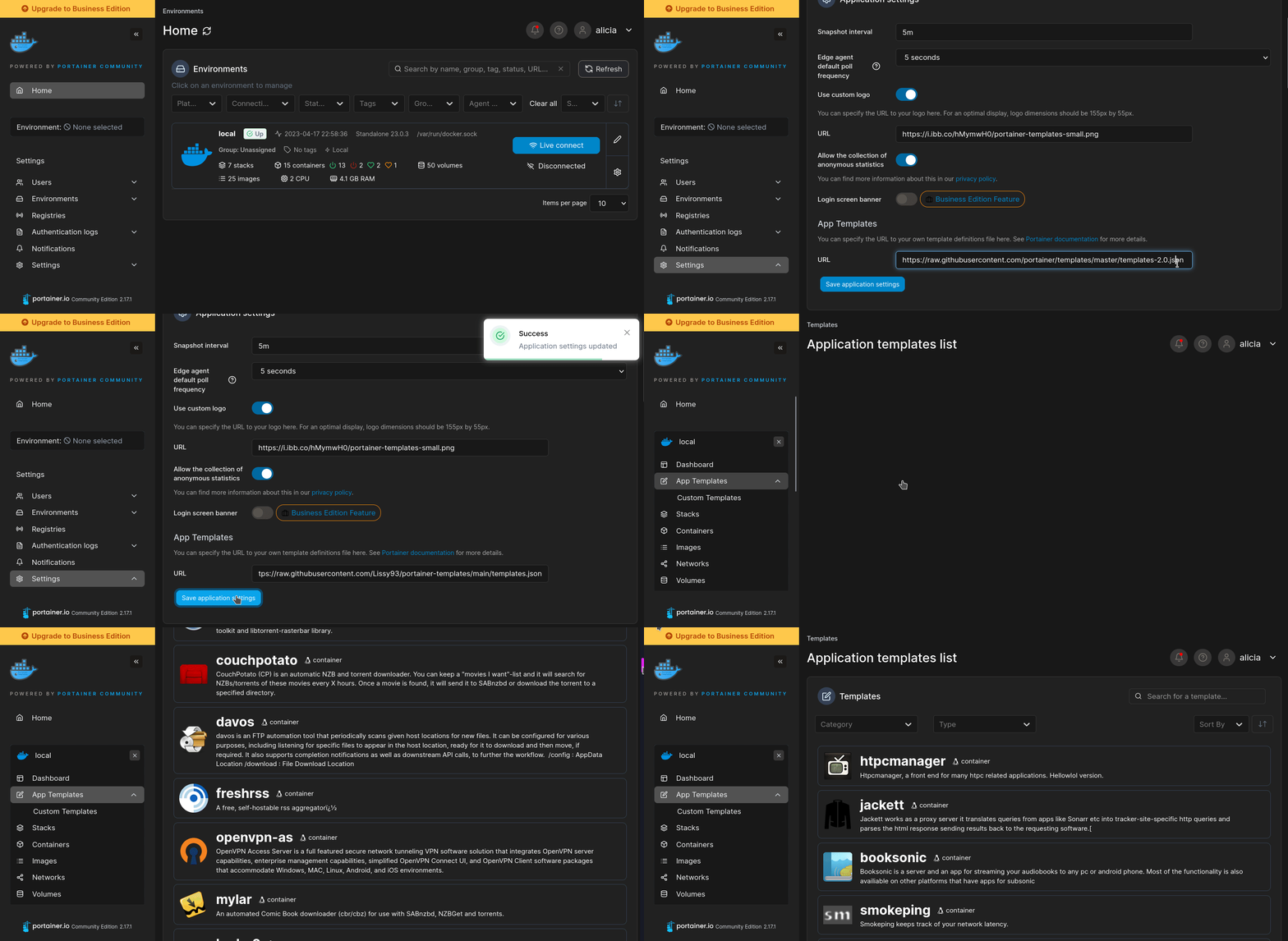
Import all app templates into your Portainer instance, for easy 1-click deploys
- Ensure both Docker and Portainer are installed, and up-to-date
- Log into your Portainer web UI
- Under Settings → App Templates, paste the below URL
- Head to Home → App Templates, and the list of apps will show up
- Select TREK, fill in any config options, and hit Deploy
Template Import URL
https://raw.githubusercontent.com/Lissy93/portainer-templates/main/templates.json
Show Me
More install options in our documentation, or see liketrek/TREK for app-specific guidance.

Every part of your trip. One app you own.
TREK has grown from a travel planner into a whole ecosystem for trips: plan together in real time on a live map, build hikes, tours and road trips, keep bookings and shared costs in order, pack, write the journal, lay out the photo book and hand the busy work to the built-in AI. Self-hosted, on the web, on your phone and offline.










PUBLIC SERVICES PROUDLY SPONSORED BY


What you get

See all features
Most of what follows is an addon an admin switches on or off. Lists, Costs, Documents, Collab, Tours, Vacay and Atlas ship on; Journey, Collections, MCP, the AI assistant, AI Parsing, Road trip, Dawarich and AirTrail ship off and are marked below.
🧭 Planning
|
🥾 Tours
|
🧳 Bookings and money
|
👥 Collaboration
|
📔 Journey and TREK Studio
|
🗺️ Atlas, Vacay and Collections
|
🤖 AI assistant and MCP
|
🧩 Plugins
|
📱 Mobile and offline
|
⚙️ Admin, accounts and security
|


Powered by dataforest cloud
<source media="(prefers-color-scheme: dark)" srcset="docs/sponsors/dataforest-light.svg" />
<source media="(prefers-color-scheme: light)" srcset="docs/sponsors/dataforest-dark.svg" />
<img src="https://raw.githubusercontent.com/liketrek/TREK/HEAD/docs/sponsors/dataforest-dark.svg" alt="dataforest cloud" height="60" />
Every TREK installation in the world searches through servers that dataforest cloud sponsors.
The place index with over 88 million places, the address search in every TREK language and the planet-wide routing all run on dataforest cloud in Frankfurt, Germany, free of charge for everyone who self-hosts TREK. Without this sponsorship, these services would not exist in this form.
Thank you, dataforest, for backing open source this generously. 💚

Looking for a server for your own TREK? dataforest cloud is where TREK's own services live.
AI usage
We use LLM-assisted coding tools across parts of this codebase. Nothing ships that a maintainer has not read and understood: every change goes through a pull request, is reviewed and tested, and has a human who can answer for it. "The AI wrote that" is not an answer any of us would accept from ourselves.See How we use AI in TREK for the details.
Get started in 30 seconds
ENCRYPTION_KEY=$(openssl rand -hex 32) docker run -d --name trek -p 3000:3000 \
  -e ENCRYPTION_KEY=$ENCRYPTION_KEY \
  -e COOKIE_SECURE=false \
  -v ./data:/app/data -v ./uploads:/app/uploads mauriceboe/trek
Open
http://localhost:3000, or http://<server-ip>:3000 from another machine. On first boot TREK seeds an admin account — if you set ADMIN_EMAIL/ADMIN_PASSWORD those are used, otherwise the credentials are printed to the container log (docker logs trek).COOKIE_SECURE=false is only for trying TREK over plain HTTP: without it the browser drops the session cookie and the login does not stick. Once TREK sits behind HTTPS (see Reverse Proxy), remove it.TrueNAS SCALE: Install TREK directly from the Community catalog. See the TrueNAS SCALE installation guide.
!TIP No server yet? TREK's own public services run on dataforest cloud, our infrastructure sponsor. A small seed is plenty for a TREK instance and is ready within a minute.
Tech stack


Real-time sync via WebSocket (
ws). Backend on NestJS 11. State with Zustand. Auth via JWT + OAuth 2.1 + OIDC + Passkeys (WebAuthn) + TOTP MFA. Weather via Open-Meteo (no key required). Maps with Leaflet and Mapbox GL.Docker Compose (production)
The repository ships a ready-to-use
docker-compose.yml
with secure defaults and every option documented inline. Download it, then:docker compose up -dSee Install with Docker Compose for the full walkthrough.
Helm (Kubernetes)
helm repo add trek https://chart.liketrek.com
helm repo update
helm install trek trek/trek
See
charts/README.md for values.Install as App (PWA)
TREK works as a Progressive Web App, and the TREK Travel Planner app for iPhone, iPad and Android connects to the same server (Native Apps). To install the web app instead:
- Open TREK in the browser (HTTPS required)
- iOS: Share ▸ Add to Home Screen
- Android: Menu ▸ Install app (or Add to Home Screen)
TREK then launches fullscreen with its own icon, just like a native app.
Updating
See Updating — Docker Compose, Docker run, Helm, Portainer, Unraid, TrueNAS SCALE and Proxmox, plus the encryption-key note.Reverse Proxy
For production, put TREK behind a TLS-terminating reverse proxy. TREK uses WebSockets for real-time sync, so the proxy must support WebSocket upgrades on
/ws.If you use the MCP addon, the proxy must also pass the
Mcp-Session-Id header through in both directions on /mcp — Nginx and Caddy do this by default, but a proxy that strips it makes every tool call open a new session instead of reusing one. See the Reverse Proxy wiki page for details.Nginx
server {
    listen 80;
    server_name trek.yourdomain.com;
    return 301 https://$host$request_uri;
}

server {
    listen 443 ssl http2;
    server_name trek.yourdomain.com;

    ssl_certificate     /etc/ssl/fullchain.pem;
    ssl_certificate_key /etc/ssl/privkey.pem;

    # 500 MB covers backup-restore uploads (capped at 500 MB server-side).
    client_max_body_size 500m;

    location / {
        proxy_pass http://localhost:3000;
        proxy_http_version 1.1;
        proxy_set_header Host $host;
        proxy_set_header X-Real-IP $remote_addr;
        proxy_set_header X-Forwarded-For $proxy_add_x_forwarded_for;
        proxy_set_header X-Forwarded-Proto $scheme;
    }

    location /ws {
        proxy_pass http://localhost:3000;
        proxy_http_version 1.1;
        proxy_set_header Upgrade $http_upgrade;
        proxy_set_header Connection "upgrade";
        proxy_set_header Host $host;
        proxy_read_timeout 86400;
    }

    # Only needed if you use the MCP addon. Responses are Server-Sent Events,
    # so buffering must be off or tool results arrive late.
    location /mcp {
        proxy_pass http://localhost:3000;
        proxy_http_version 1.1;
        proxy_set_header Host $host;
        proxy_set_header X-Real-IP $remote_addr;
        proxy_set_header X-Forwarded-For $proxy_add_x_forwarded_for;
        proxy_set_header X-Forwarded-Proto $scheme;
        proxy_buffering off;
        proxy_read_timeout 3600s;
    }
}
Caddy
trek.yourdomain.com {
    reverse_proxy localhost:3000
}
Caddy handles TLS and WebSockets automatically.
Environment variables
Every variable, its default and what it does: see Environment Variables.Data sources
The Atlas map's country and sub-national (province/county) boundaries come from geoBoundaries (Runfola et al., 2020), licensed CC BY 4.0; Ireland's counties come from Tailte Éireann, also CC BY 4.0. See NOTICE.md for full third-party attributions.License
TREK is AGPL v3. Self-host freely for personal or internal company use. If you modify and offer TREK as a network service to third parties, your modifications must be open-sourced under the same licence.Serve TREK on your own domain behind Caddy, Nginx or Traefik. Fill in your domain and copy the result. It's a starting point, some apps need their own base URL or extra headers set too.
Proxying trek.example.com to http://trek:3000
Add this to your Caddyfile
trek.example.com {
	reverse_proxy http://trek:3000
}Check the logs first
Nine times out of ten the logs tell you exactly what went wrong.
- In Portainer, go to Containers, click the container, then Logs. Or run
docker logs trek - Exit codes help too:
137means killed, usually out of memory.126or127means the command inside the image is broken.
Port already in use
If deployment fails with "Bind for 0.0.0.0:8099 failed: port is already allocated", something else on your server is using that port.
- Find what's using it:
sudo ss -tlnp | grep :8099 - Stop the other service, or pick a different host port. In
8099:3000only the left number is yours to change, the right one belongs to the app.
Running but the page won't load
The container is up but nothing appears in your browser.
- Use your server's real IP:
http://your-server-ip:8099. The 0.0.0.0 link Portainer shows isn't a real address. - Give it a minute after first deploy, trek can take a while to initialise.
- Make sure your firewall allows the port, e.g.
sudo ufw allow 8099
Image won't pull
Test the pull directly on the host: docker pull mauriceboe/trek:4
- "manifest unknown" means the tag no longer exists.
- "toomanyrequests" is the Docker Hub rate limit. Log in with
docker loginto raise it. - "no space left on device" means a full disk. Reclaim space with
docker system prune
"exec format error"
This means the image was built for a different CPU architecture than your server.
- This image supports:
amd64, arm64 - Check yours with
uname -m: x86_64 is amd64, aarch64 is arm64. Raspberry Pi and other ARM boards are the usual culprits.
Container keeps restarting
The unless-stopped restart policy relaunches the app after every crash, so the real error can scroll past.
- Check the logs right after a restart, the last few lines before it died are the useful ones.
- Get the exit code with
docker inspect trek --format '{{.State.ExitCode}}' - Still stuck? Redeploy once with the restart policy set to
noso the failure stays visible.
Raise an issue
Found something which isn't working as it should? Here's how to report it.
- Bug within the app: Open an issue on liketrek/TREK
- Template not working: Open an issue on NotAFlightRisk/portainer-templates-extras
- This website not working: Open an issue on lissy93/portainer-templates
A single container
TREK runs as one container, the simplest kind of app here. Just the one image to pull and nothing else wired up alongside it.
The app image
An image is the app packed up ready to go, everything TREK needs bundled into one download. This template pulls mauriceboe/trek:4, which Docker fetches once (about 632 MB) and then starts your own copy from.
Where the image comes from
Docker pulls its images from registries, public libraries of ready-built apps. TREK's comes from Docker Hub, published by mauriceboe.
Version tags
The bit after the colon in the image name is the version tag. This one pins 4, so every redeploy gives you that exact build until you bump it yourself.
Which machines it runs on
Every image is built for particular CPU types. This one ships for amd64, arm64, so it runs on both regular x86 servers and ARM boards like a Raspberry Pi.
Ports
A port is the door the app answers on. A mapping like 8099:3000 means it's reachable on port 8099 of your server, where the left number is yours to change and the right one belongs to the app. Once it's running, open http://your-server-ip:8099 in a browser. It opens:
8099:3000, likely the web interface
Volumes
A volume is where TREK keeps its files so they survive an update or a restart. Without one, anything it saves would sit inside the container and vanish the moment it's recreated. This template mounts:
/app/dataas a volume Docker manages for you/app/uploadsas a volume Docker manages for you
Environment variables
Environment variables are the settings you hand over when you deploy, things like a password or a timezone. TREK takes 2 of them, all with defaults you can leave alone or tweak:
COOKIE_SECURE, pick one offalse, true. TREK only sends its login cookie over HTTPS unless this is on. Switch it off once it's behind a reverse proxy with HTTPS.TZ, defaults toUTC. Like Europe/London. Reminders and scheduled jobs run on it.
Restart policy
The restart policy here is unless-stopped, so Docker restarts TREK after a crash or reboot, but leaves it off when you stop it on purpose. You can change this on the deploy screen. The choices are no (never restart), on-failure (only after a crash), unless-stopped (restart unless you stop it), and always (bring it back no matter what).
Networking
Nothing custom is set, so TREK sits on Docker's default bridge network: its own private space that reaches the outside world only through the ports it publishes.
Container name
Once it's deployed, Portainer names the container trek. That's what you'll spot in the containers list and use in commands like docker logs trek.
Platform
The platform is linux, the kind of system the container is built to run on. Docker and Portainer handle this on a normal Linux server.
Open source license
TREK is open source, released under the AGPL-3.0 license. In plain terms the code is out in the open, so you're free to run it and change it to fit what you need.
Portainer app templates
Zooming out, this whole page comes from a Portainer app template: a short recipe telling Portainer how to set TREK up. Add the template list to Portainer once, then deploying TREK is a click rather than a wall of config.