
![Termix]() Termix
Container
SSH terminal and server manager in the browser, with saved hosts, tunnels and a file editor. Source: https://github.com/Termix-SSH/Termix
Image details
Source details
Configuration
TypeContainerlinuxghcr.io/lukegus/termix:latest8080:8080/tcp/app/dataunless-stoppedTemplate by NotAFlightRisk
Report issueNotes
http://<your-host>:8080 and create an account, which becomes the admin. Registration stays open after that, so switch it off in the admin settings unless you want other people signing up. Hosts, keys and the database live in the /app/data volume, and its secrets are generated there on first start. Behind a reverse proxy it needs websockets. It sends a small anonymous usage report once a day, which you can switch off in Admin Settings > Usage Statistics. Docs: docs.termix.siteStandalone Install
Select an install method, to see config/commands for deploying Termix
Install on Portainer
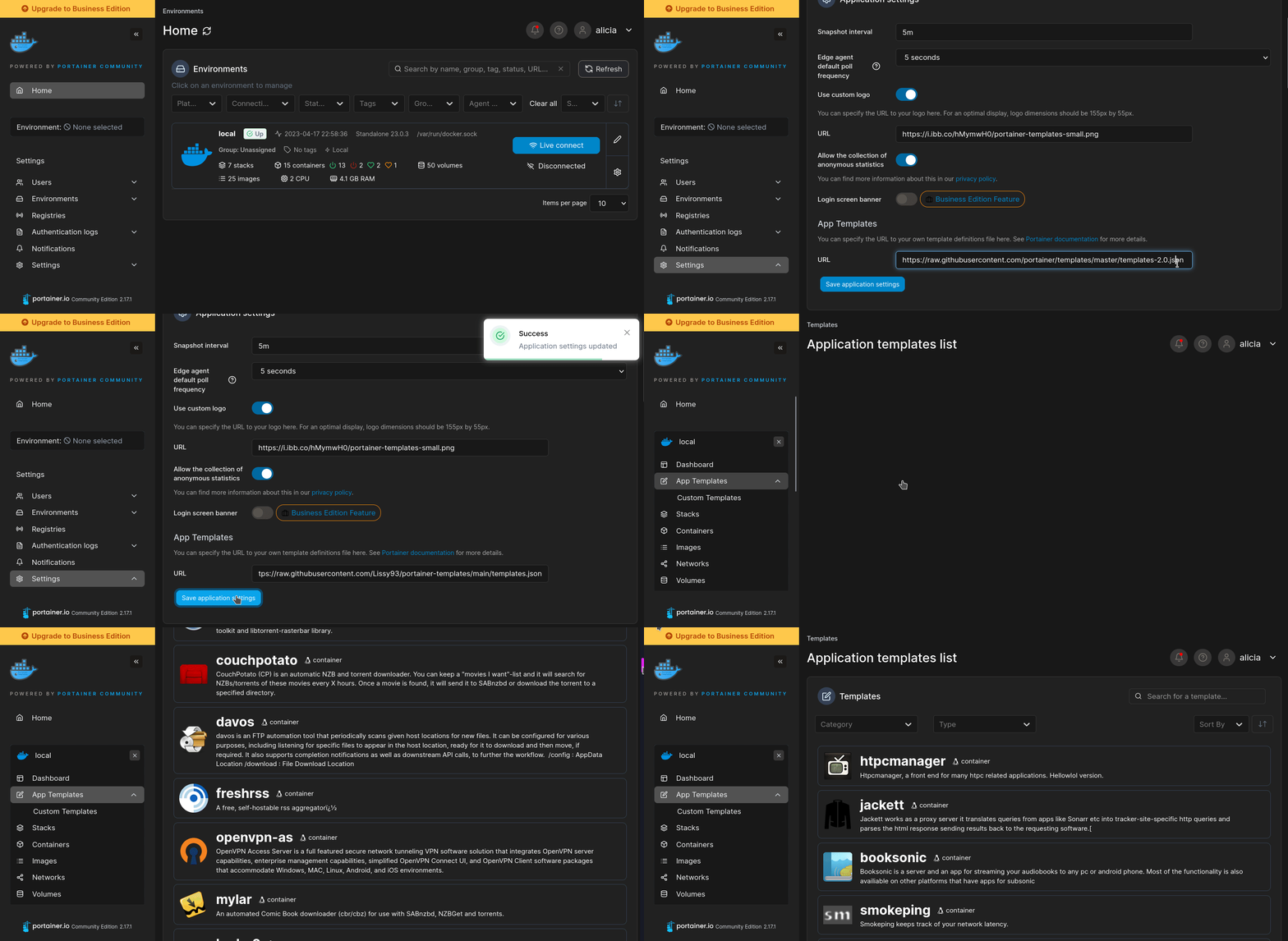
Import all app templates into your Portainer instance, for easy 1-click deploys
- Ensure both Docker and Portainer are installed, and up-to-date
- Log into your Portainer web UI
- Under Settings → App Templates, paste the below URL
- Head to Home → App Templates, and the list of apps will show up
- Select Termix, fill in any config options, and hit Deploy
Template Import URL
https://raw.githubusercontent.com/Lissy93/portainer-templates/main/templates.json
Show Me
More install options in our documentation, or see Termix-SSH/Termix for app-specific guidance.

Termix
Self-hosted, plugin-based server management


Overview
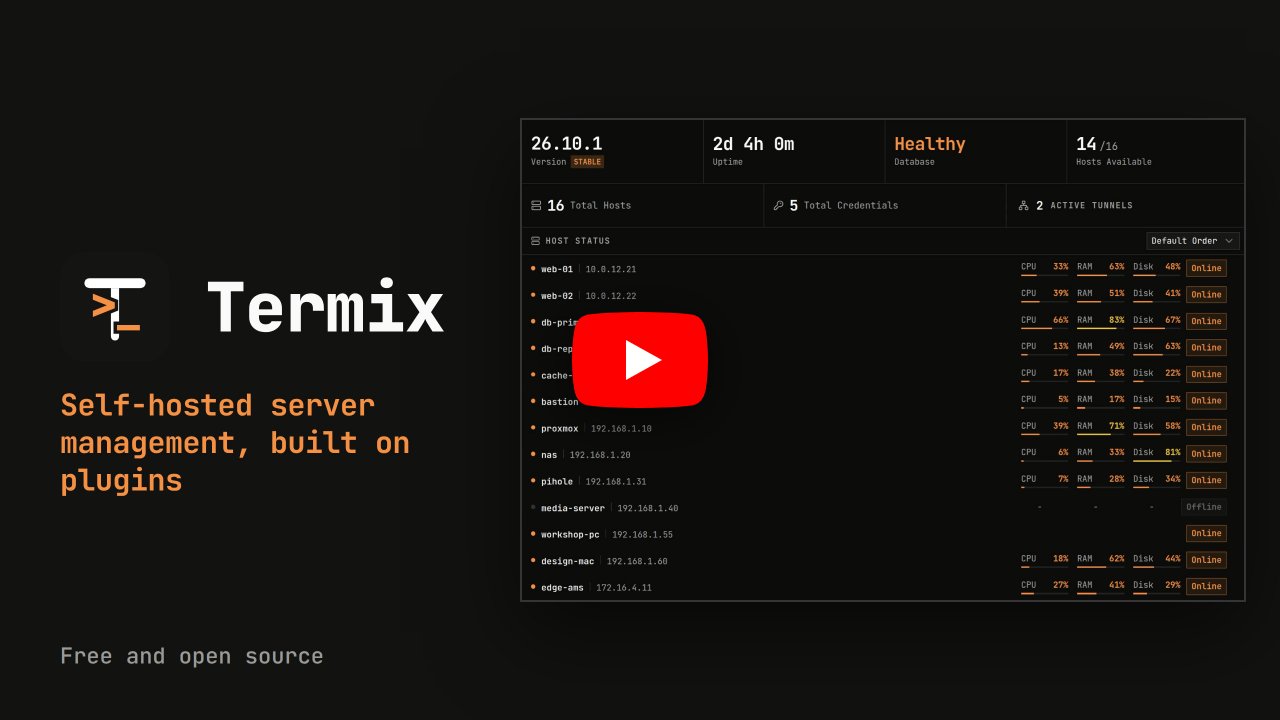
Termix is a free, open source, self-hosted server management platform built on plugins. The core keeps your hosts, credentials, users, sharing and sessions. Everything else, like the SSH terminal, remote desktop, file manager, Docker and metrics, is a plugin you can turn on, off or remove.It runs on web, desktop and mobile. Think of it as a free, self-hosted Termius.
Try the Demo
Try it at demo.termix.site. Any username and password works.Core
What every install has, with or without plugins:- Hosts: Save hosts in nested folders with tags and parent hosts, bulk edit, import and export, and use Quick Connect for one-off connections
- Credentials: Reuse saved passwords and keys across hosts, with host defaults you can set for the server, a user or a folder
- Sharing and Roles: Share hosts, credentials and folders with users or roles at four levels: connect, view, edit and manage
- Accounts: Local accounts, sessions you can see and revoke, trusted devices, API keys and an audit log
- Security: Passwords, keys and other secrets are encrypted per user, and the database can be encrypted on disk
- Desktop Sync: The desktop app runs on its own and can link to a Termix server to keep an offline copy of your account
- Interface: Tabs and split screen, a command palette (double tap left shift), rebindable shortcuts, themes, branding and around 30 languages
- Databases: SQLite by default, with PostgreSQL and MySQL supported too
Plugins
Plugins add everything else. Admins can install, update or remove plugins from the Plugins tab, and each plugin has its own repo. These ship in the default image:| Plugin | What it does |
|---|---|
| Alerts | One inbox for every alert in Termix, with delivery to webhooks, ntfy, Discord and email. |
| Classic Layout | The classic Termix layout with an icon rail, sidebar, tab bar and dock. |
| Classic Themes | Light, dark and seven more color themes for Termix. |
| Credential Tools | Generate SSH keys, check them and copy a public key to a host. |
| Docker | Manage Docker and Podman containers on your hosts over SSH, with logs, stats and a console. |
| File Manager | Browse, edit and move files over SFTP, FTP, WebDAV and SMB, including straight from one server to another. |
| Host Metrics | Live CPU, memory, disk, network and GPU stats, plus tools to manage your hosts. |
| Host Layout | A host first Termix layout with a tree of hosts and every tool as a tab on the selected host. |
| Host Status | Shows if each host is online with a dot in the host list, checked by connecting to its port. |
| Import and Export | Import hosts from a JSON file or an SSH config file and export them to share or back up. |
| Operations Center | Run, roll out, approve and track every plugin action across your hosts, with a page per host and tables across all of them. |
| Original Layout | The Termix layout from before 2.3.0, with a floating sidebar of host folders and a floating tab bar. |
| Passkeys | Sign in with a passkey or security key instead of a password. |
| Remote Desktop | RDP, VNC, Apple Remote Desktop, RustDesk and Telnet sessions in your browser, with clipboard, file transfer, sharing and recording. |
| Serial | Open a serial console to a router, switch or other device plugged into your computer. |
| Simple Layout | A simple Termix layout for small setups with a top bar, a Home screen and only the basics. |
| Single sign-on | Sign in with any OpenID Connect provider, GitHub or Google. |
| Snippets | Save the commands you run often and run them in a terminal or on many hosts in one click. |
| SSH Terminal | SSH terminal sessions with tabs, split screen, history, macros and a local terminal in the desktop app. |
| Sync | Sync the desktop app with one or more servers, and manage other Termix servers as remote sites from a master. |
| Terminal Layout | A terminal first Termix layout with a command palette for everything and tiled panes like tmux. |
| TOTP | Two-factor sign in with a code from an authenticator app, with backup codes. |
| Tunnels | SSH port forwarding that reconnects on its own, WireGuard gateways that publish private services, and client tunnels from the desktop app. |
| Usage Statistics | Sends a small anonymous daily report so we can see how Termix is used. |
| Wall Display | A full screen Termix layout for a TV or spare monitor that cycles through your status views. |
| Workspaces | Save your open tabs and split layouts and reopen them in one click. |
All other official plugins (53)
These ship in the
-full image tags (like latest-full) and the full desktop builds. On any other install, add them from the Plugins tab.| Plugin | What it does |
|---|---|
| ACME Certificates | Gets the Termix HTTPS certificate from Let's Encrypt or any ACME provider and renews it for you. |
| AI Assistant | An AI assistant that reads your setup and proposes changes for you to approve. |
| Ansible | Run Ansible playbooks and ad-hoc commands from a control host, with an inventory made from your Termix hosts. |
| Audit Tools | Send the audit log to your SIEM and export it as CSV or NDJSON. |
| Automations | Run steps on your hosts on a schedule or when something happens. |
| Backups | Back up folders, databases and Docker data on your hosts with restic, then browse, download and restore. |
| Certificates | See, issue and renew TLS certificates on your hosts with certbot and acme.sh, and get an alert before they expire. |
| Cloud Providers | Add hosts from AWS, Azure, Google Cloud, DigitalOcean, Hetzner and other clouds, and keep them in sync. |
| Cron | See, add and run cron jobs on your hosts, with a schedule preview and the system cron files. |
| Databases | Browse and edit MySQL, MariaDB, PostgreSQL, SQL Server, SQLite, Redis and MongoDB databases on your hosts from one tab. |
| DNS | Manage DNS records and domains across Cloudflare, Route 53, Namecheap and other providers. |
| Firewall | Manage UFW, firewalld, nftables and iptables rules on your hosts over SSH, with lockout protection. |
| Fleets | Group hosts into fleets and run commands, package actions and file transfers on all of them at once. |
| Git | See, pull, commit and push git repos on your hosts, and keep them up to date with auto pull. |
| Homepage | A drag and drop widget page for your servers and services, plus service links for the dashboard. |
| Hosts Config | Keep hosts, folders and sharing in a YAML or JSON file. Termix loads them as read only hosts and reloads when the file changes. |
| IP-KVM | See and control machines through PiKVM, NanoKVM and JetKVM devices. |
| Kubernetes | Manage Kubernetes clusters from your hosts over SSH, with logs, metrics, YAML and a shell. |
| LDAP | Sign in with your LDAP or Active Directory username and password. |
| Log Search | Search logs from the journal, log files and Docker containers across many hosts at once. |
| Login Security | Sign people out when idle, limit session length, turn off remember me and require a second factor at login. |
| Network Devices | See and manage routers, switches and access points over SNMP and router APIs. |
| Network Topology | Draws your hosts and the links between them as a live, interactive graph. |
| Notes | Write markdown notes for each host, folder or yourself, with commands you can copy or send to the terminal. |
| Object Storage | Browse and manage S3-compatible object storage buckets and files. |
| OPKSSH | Connect to hosts with short-lived OpenPubkey SSH certificates after signing in with your identity provider. |
| Out-of-band | Power, sensors, event logs and consoles for server BMCs over Redfish, IPMI and Intel AMT. |
| Packages | See and install updates on your hosts, search, install and remove packages, and read the package history. |
| Privileged Access | Ask for approval before anyone connects to a privileged host, with access that ends on its own and a full audit trail. |
| Process Manager | See and control running processes, pm2 and supervisor apps on your hosts, read their logs and get alerts when they fail. |
| Proxmox | Import Proxmox VE guests as hosts, keep them in sync and watch node stats. |
| Reverse Proxy | Reverse proxy for TCP, UDP, HTTP and HTTPS with free certificates and Termix login, managed per host. |
| Samba Shares | Create and manage Samba (SMB) file shares, users and permissions on your hosts from one tab. |
| SCIM Provisioning | Create, update and remove Termix accounts and roles from your identity provider with SCIM. |
| Secret Sources | Pull host passwords and keys from 1Password, Bitwarden, Infisical or HashiCorp Vault when you connect instead of storing them in Termix. |
| Security Center | Audit SSH keys, rotate them and scan hosts for known vulnerabilities over SSH. |
| Services | Manage services, timers and logs on your hosts over SSH. |
| Session Recording | Record terminal and remote desktop sessions, watch them live, and keep an audited, encrypted record of who did what. |
| Session Sharing | Share live sessions by link or with another user, and present sessions to a group in meeting rooms. |
| SSH Certificate Signer | Connect to hosts with short-lived SSH certificates signed by HashiCorp Vault or OpenBao. |
| Step CA | Connect to hosts with short-lived SSH certificates from a smallstep step-ca server. |
| Storage Health | Watch drive and array health over SSH: SMART, NVMe, ZFS, mdadm, btrfs and LVM, with history, alerts and self tests. |
| Tailscale | Add tailnet devices as hosts and connect with Tailscale SSH. |
| Termix Identity | Publish your SSH public keys under a public handle and run your own SSH certificate authority. |
| Tmux Monitor | Browse and control tmux sessions, windows and panes across your hosts. |
| UPS Manager | Watch your UPS devices over NUT, apcupsd or SNMP, with history, alerts and self tests. |
| Uptime | Watch websites, ports, hosts and services, get alerts when they go down, and publish status pages. |
| Users | Manage the user accounts, groups, passwords and SSH keys on your hosts. |
| Virtual Machines | Create and manage KVM virtual machines on your Linux hosts over SSH with libvirt. |
| Wake-on-LAN | Wake, shut down and track your machines from one power dashboard. |
| Warpgate | Connect to hosts through a Warpgate SSH bastion. |
| Web Endpoint | Open a host's web UI inside Termix, directly or over an SSH tunnel. |
| Web Servers | Manage nginx, Apache and Caddy on your hosts: sites, config, logs and HTTPS, with every change tested first. |
| WireGuard | Install WireGuard on your hosts and manage interfaces, clients and configs from one tab. |
Want to build your own? Start from the plugin template. Plugins you can install are listed in the registry. Turn on the community registry in Plugins, Registries to install plugins made by other people, or add your own registry. See submitting a plugin and hosting your own registry.
Platform Support
| Platform | Distribution |
|---|---|
| Web | Any modern browser (Chrome, Safari, Firefox) | PWA support |
| Windows x64/arm64 | Portable | EXE and MSI Installer | Full EXE (all plugins) | Chocolatey |
| Linux x64/arm64 | Portable | AUR | AppImage | Deb | Full AppImage and Deb (all plugins) | Flatpak |
| macOS Universal/x64/arm64, v12.0+ | Apple App Store | DMG | Full DMG (all plugins) | Homebrew |
| iOS/iPadOS v15.1+ | Apple App Store | IPA |
| Android v7.0+ | Google Play Store | APK |
Installation
See the docs for install steps on every platform.On macOS, Termix, Menu Bar Icon picks a monochrome icon (the default), a color icon or no icon. The choice is saved on this device. With the icon hidden, open Termix from the Dock to change it back, and closing the last window quits the app.
Sample Docker Compose file. Remote desktop (RDP, VNC and Telnet) is built in, so nothing else needs to run next to it:
services:
  termix:
    image: ghcr.io/termix-ssh/termix:latest
    container_name: termix
    restart: unless-stopped
    ports:
      - "8080:8080"
    volumes:
      - termix-data:/app/data
    environment:
      PORT: "8080"

volumes:
  termix-data:
    driver: local
Cloud Hosting
If Termix runs on the network it manages, an outage takes it down right when you need it. A VPS keeps it reachable, gives you a static IP and works from anywhere without a VPN or port forward.GINERNET sponsors Termix and the docs have a setup guide for their VPS.
Donate
Termix has no paid plans. Donations cover servers, domains and development time.Donate
Sponsors
For a paid sponsor spot, email mail@termix.site.


Support
Bugs and ideas for Termix itself (login, hosts, credentials, sharing, sync, the app and desktop app) go in this repo: report a bug or request a feature.Every plugin has its own repo, so a problem with the terminal, file manager, Docker, remote desktop or any other plugin goes in that plugin's repo (see the table above, or use Report an issue on the plugin's page in the app, which fills in your versions for you). Not sure where it goes? Open it here and it will be moved.
You need a GitHub account. Add as much detail as you can, in English if possible.
For discussions and questions, join the Discord server. Update videos are on YouTube.
License
Apache License 2.0. See LICENSE.Serve Termix on your own domain behind Caddy, Nginx or Traefik. Fill in your domain and copy the result. It's a starting point, some apps need their own base URL or extra headers set too.
Proxying termix.example.com to http://termix:8080
Add this to your Caddyfile
termix.example.com {
	reverse_proxy http://termix:8080
}Check the logs first
Nine times out of ten the logs tell you exactly what went wrong.
- In Portainer, go to Containers, click the container, then Logs. Or run
docker logs termix - Exit codes help too:
137means killed, usually out of memory.126or127means the command inside the image is broken.
Port already in use
If deployment fails with "Bind for 0.0.0.0:8080 failed: port is already allocated", something else on your server is using that port.
- Find what's using it:
sudo ss -tlnp | grep :8080 - Stop the other service, or pick a different host port. In
8080:8080only the left number is yours to change, the right one belongs to the app.
Running but the page won't load
The container is up but nothing appears in your browser.
- Use your server's real IP:
http://your-server-ip:8080. The 0.0.0.0 link Portainer shows isn't a real address. - Give it a minute after first deploy, termix can take a while to initialise.
- Make sure your firewall allows the port, e.g.
sudo ufw allow 8080
Image won't pull
Test the pull directly on the host: docker pull ghcr.io/lukegus/termix:latest
- "manifest unknown" means the tag no longer exists. This template uses
latest, so try pinning a specific version instead. - "toomanyrequests" is the Docker Hub rate limit. Log in with
docker loginto raise it. - "no space left on device" means a full disk. Reclaim space with
docker system prune
"exec format error"
This means the image was built for a different CPU architecture than your server.
- This image supports:
amd64, arm64 - Check yours with
uname -m: x86_64 is amd64, aarch64 is arm64. Raspberry Pi and other ARM boards are the usual culprits.
Container keeps restarting
The unless-stopped restart policy relaunches the app after every crash, so the real error can scroll past.
- Check the logs right after a restart, the last few lines before it died are the useful ones.
- Get the exit code with
docker inspect termix --format '{{.State.ExitCode}}' - Still stuck? Redeploy once with the restart policy set to
noso the failure stays visible.
Raise an issue
Found something which isn't working as it should? Here's how to report it.
- Bug within the app: Open an issue on Termix-SSH/Termix
- Template not working: Open an issue on NotAFlightRisk/portainer-templates-extras
- This website not working: Open an issue on lissy93/portainer-templates
A single container
Termix runs as one container, the simplest kind of app here. Just the one image to pull and nothing else wired up alongside it.
The app image
An image is the app packed up ready to go, everything Termix needs bundled into one download. This template pulls ghcr.io/lukegus/termix:latest, which Docker fetches once (about 212 MB) and then starts your own copy from.
Where the image comes from
Docker pulls its images from registries, public libraries of ready-built apps. Termix's comes from the GitHub Container Registry, published by lukegus.
Version tags
The bit after the colon in the image name is the version tag. Here it's latest, which always points at the newest build, so a redeploy can bump you to a newer release without you asking. Pin a specific tag if you would rather stay on one version.
Which machines it runs on
Every image is built for particular CPU types. This one ships for amd64, arm64, so it runs on both regular x86 servers and ARM boards like a Raspberry Pi.
Ports
A port is the door the app answers on. A mapping like 8080:8080 means it's reachable on port 8080 of your server, where the left number is yours to change and the right one belongs to the app. Once it's running, open http://your-server-ip:8080 in a browser. It opens:
8080:8080, likely the web interface
Volumes
A volume is where Termix keeps its files so they survive an update or a restart. Without one, anything it saves would sit inside the container and vanish the moment it's recreated. This template mounts:
/app/dataas a volume Docker manages for you
Restart policy
The restart policy here is unless-stopped, so Docker restarts Termix after a crash or reboot, but leaves it off when you stop it on purpose. You can change this on the deploy screen. The choices are no (never restart), on-failure (only after a crash), unless-stopped (restart unless you stop it), and always (bring it back no matter what).
Networking
Nothing custom is set, so Termix sits on Docker's default bridge network: its own private space that reaches the outside world only through the ports it publishes.
Container name
Once it's deployed, Portainer names the container termix. That's what you'll spot in the containers list and use in commands like docker logs termix.
Platform
The platform is linux, the kind of system the container is built to run on. Docker and Portainer handle this on a normal Linux server.
Open source license
Termix is open source, released under the Apache-2.0 license. In plain terms the code is out in the open, so you're free to run it and change it to fit what you need.
Portainer app templates
Zooming out, this whole page comes from a Portainer app template: a short recipe telling Portainer how to set Termix up. Add the template list to Portainer once, then deploying Termix is a click rather than a wall of config.